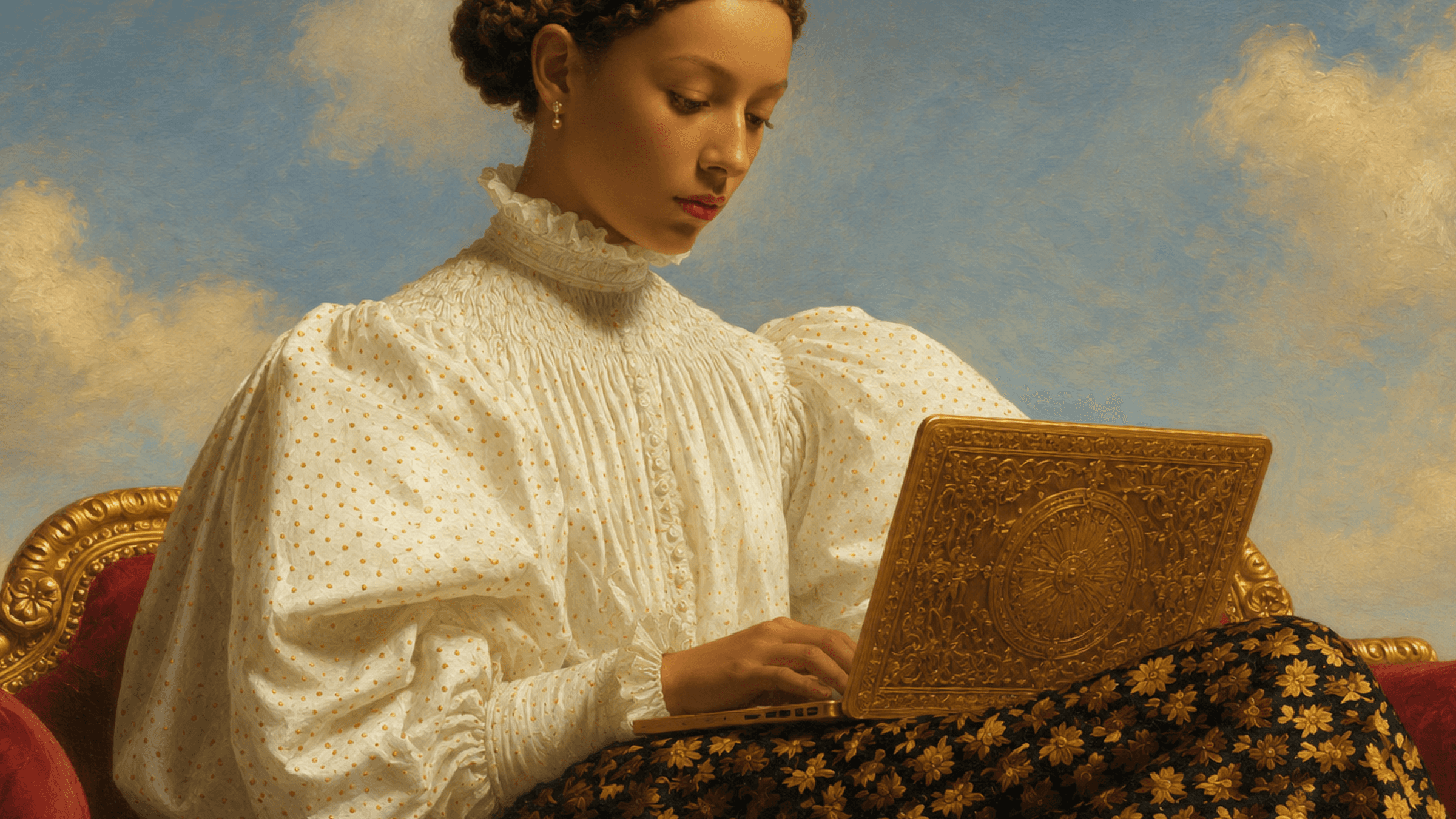

Can a designer actually ship with ChatGPT Images 2.0? OpenAI bills it as designed for production-quality visuals: greater control and better performance with small text, iconography, UI elements, dense compositions, and subtle stylistic constraints. It's also the model that swept our brand-campaign eval against Seedream 5.0 Lite, Gemini 3.1 Flash Image Preview, and Flux 2 Pro. So we pressure-tested the harder claim: production readiness.
To test this, we designed six fictional campaign types to stress the visual dimensions OpenAI highlighted in the GPT Image 2 launch: small text and iconography, dense compositions, UI elements, and subtle stylistic constraints, plus realism, texture, and depth of field.
Every session was recorded end-to-end with Rollout, Contra Labs' session-capture tool. Rollout captures the screen, video, audio, mouse trails, clicks, and keyboard input, including everything designers did after they left the tool being evaluated. Full methodology at the end of the article.
The production-readiness gap
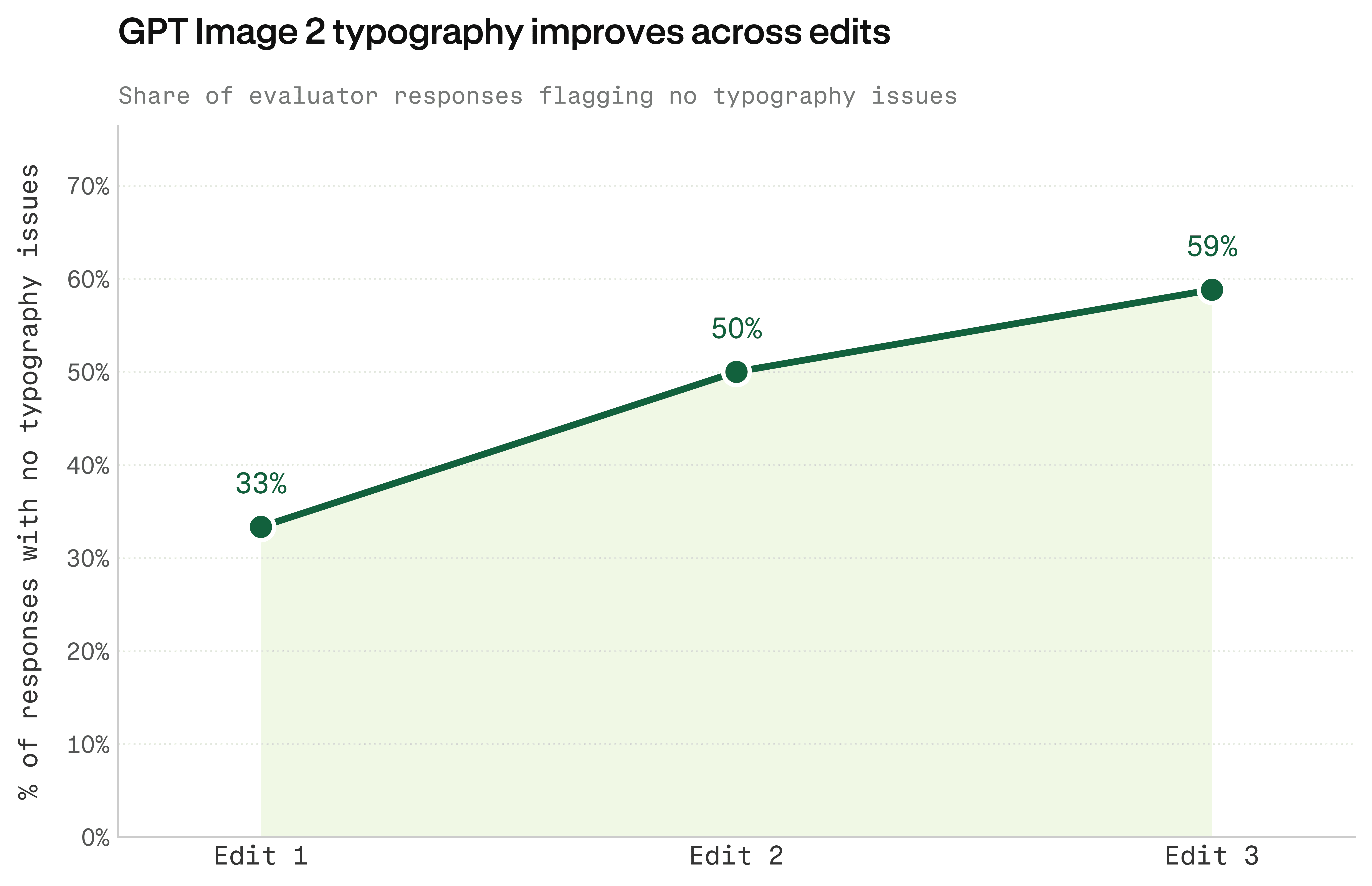
ChatGPT Images 2.0 doesn't fail evenly across the Rollout. Typography gets better with iteration. Prompt adherence gets worse. Designers can hear themselves doing both.
Typography improves with editing, and designers walk through the fix in real time:
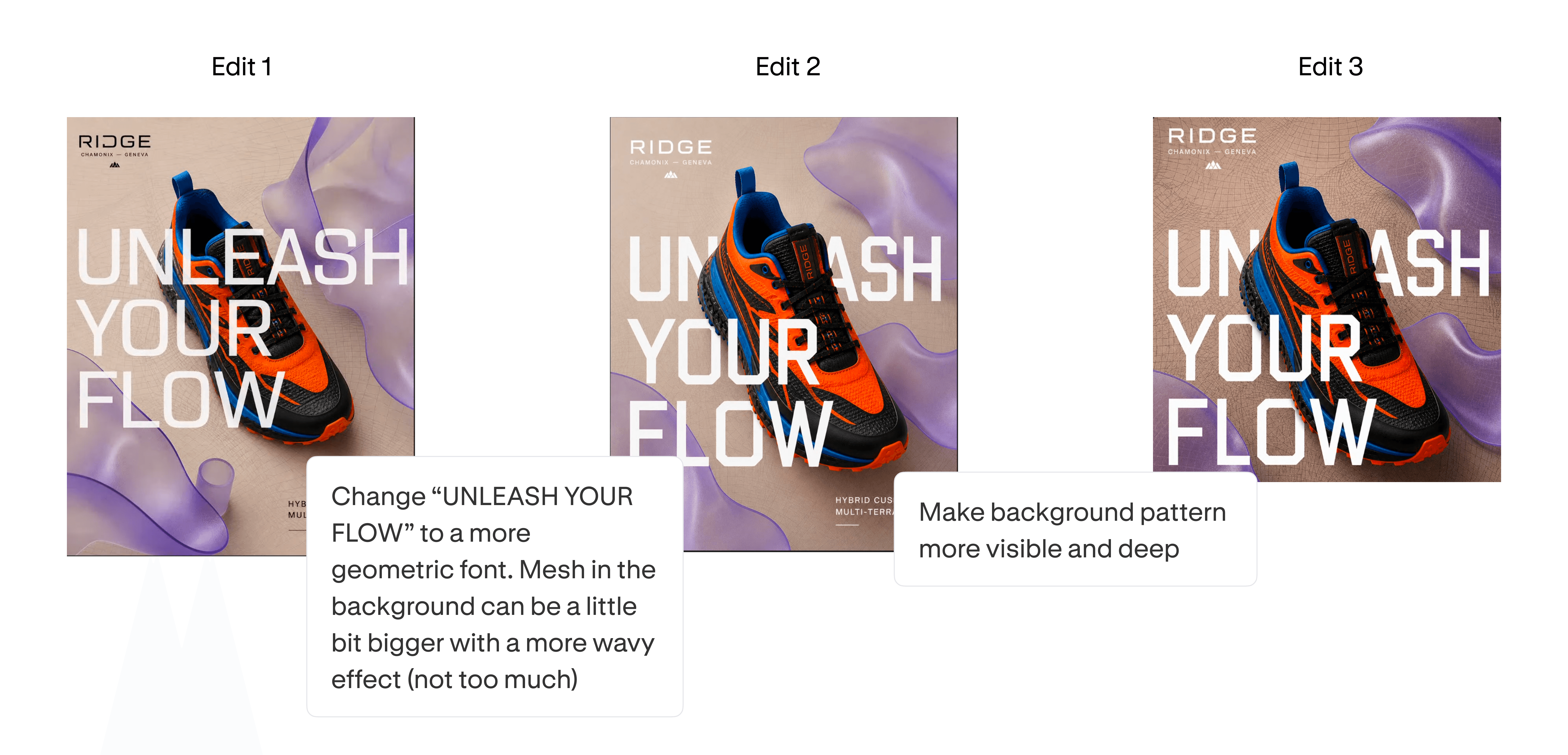
Edit 1: "The small text in general feels not very sharp, but it is still... it's very readable."
Edit 2: "Okay, now going to prompt some changes I wanted to make. So change initial font to original font and background can be a bit better."
Edit 3: Typography, now I think we are good, but still maybe on the logo. Um, well, it's the same as before. I would say no issues.
By Edit 3, the same designer has gone from saying "not very sharp" to "no issues, that looks good." Typography is fixable on iteration.
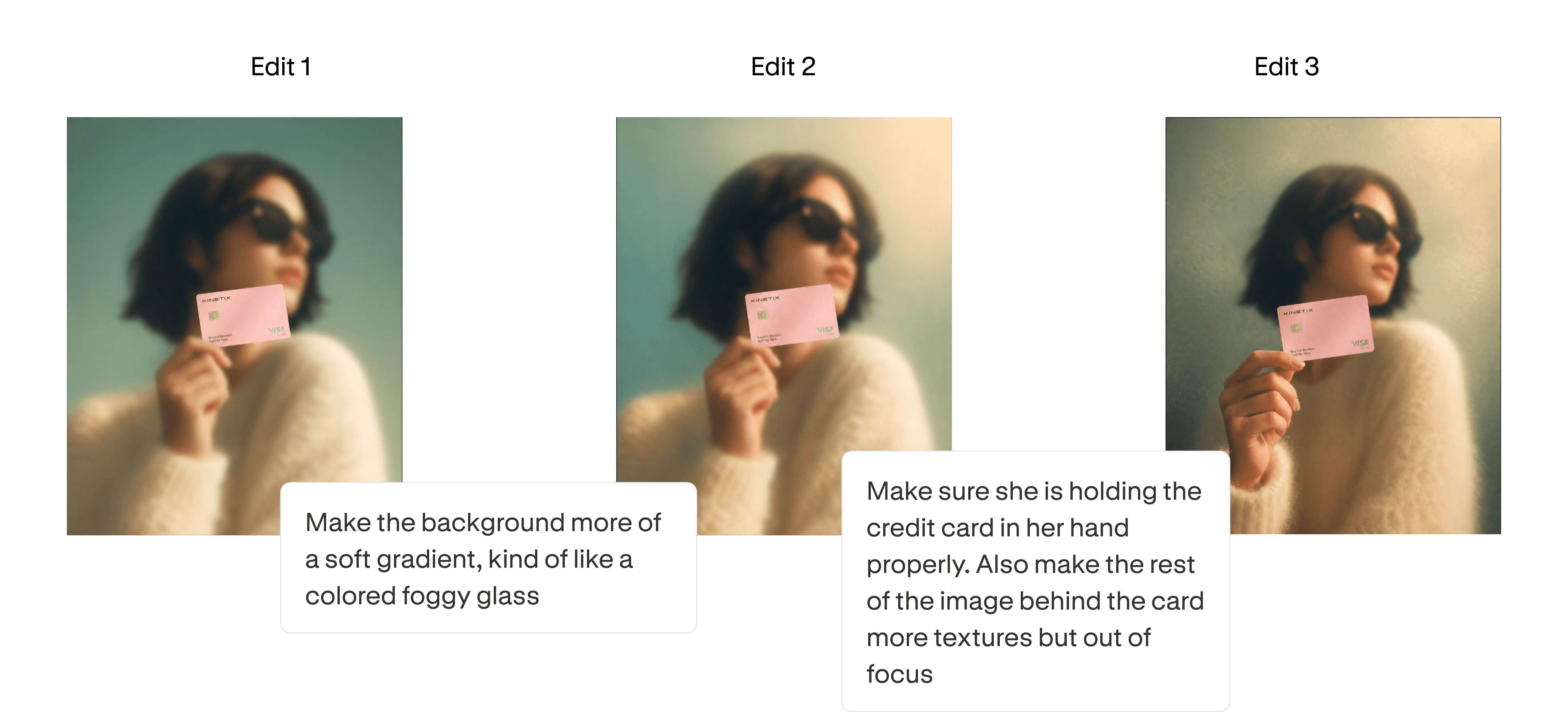
Prompt adherence gets worse.
Edit 1: "I like that. And the focus on just the credit card, as mentioned in the prompt, is pretty spot on. She is, like, kind of posing. It's cool. That's a cool image. I like that."
Edit 2: "What could I edit? Make the background more of a soft gradient, kind of like colored foggy glass. I don't know why that's the vibe it gave me. So what will it give me?"
Edit 3: "I don't think this was, uh, no, really that good. I don't like the background. It looks low resolution, I did not ask for that. Her, half of her body went somewhere."
By Edit 3, GPT has drifted from "spot on the prompt" to inventing texture and losing anatomy. The longer designers iterate, the more the model lets go of the original brief.
Edit 3 is a regression. The longer designers iterate, the more likely GPT is to lose track of the original brief.
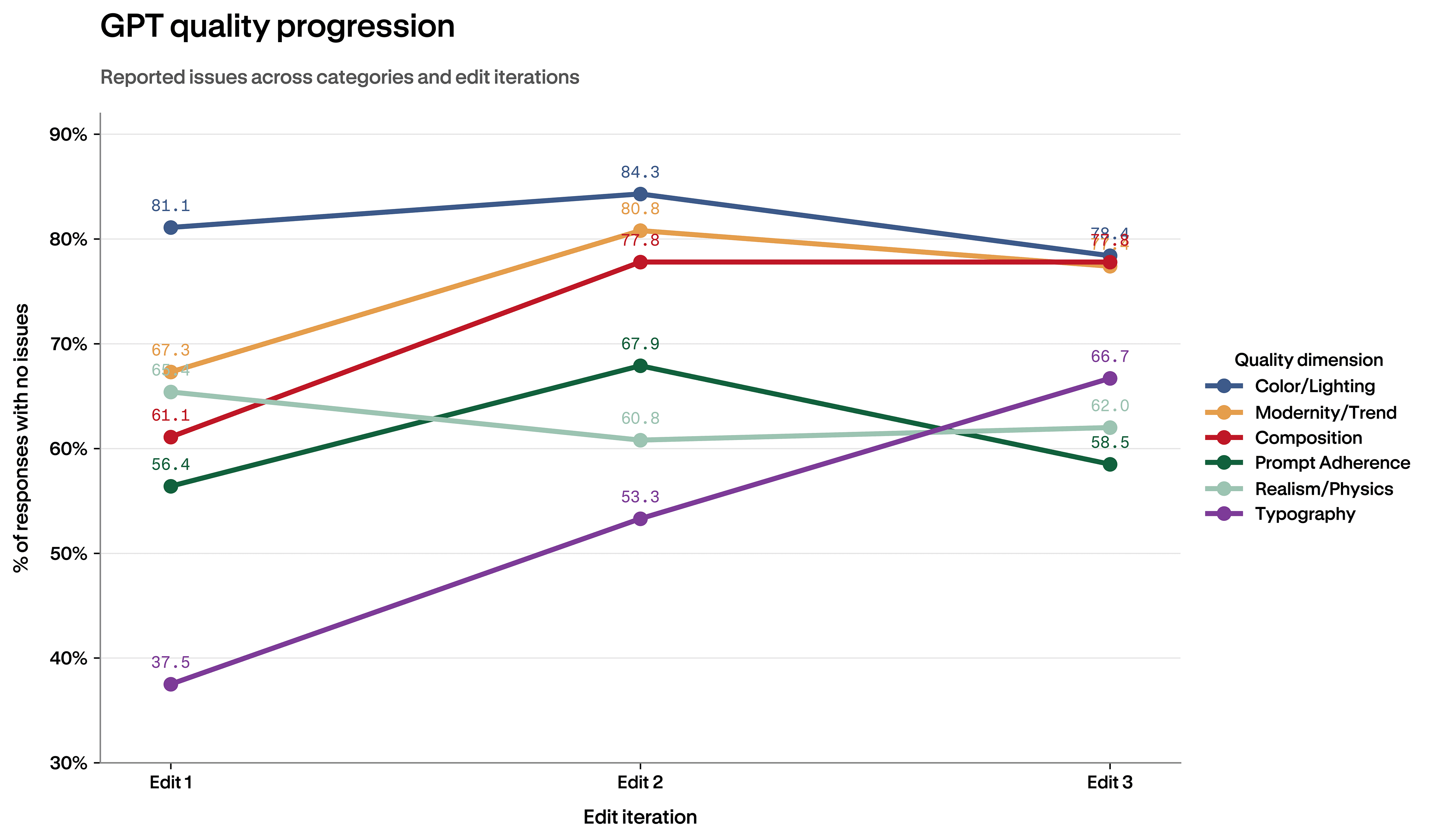
Prompt adherence isn't alone in regressing. Color and lighting follow the same arc. Realism and physics is among the worst-performing dimensions at every iteration, hovering around the 60-65% mark. Typography climbs with editing. Prompt adherence regresses. Realism just sits there. It's the dimension designers leave GPT for.
What designers were actually asking for
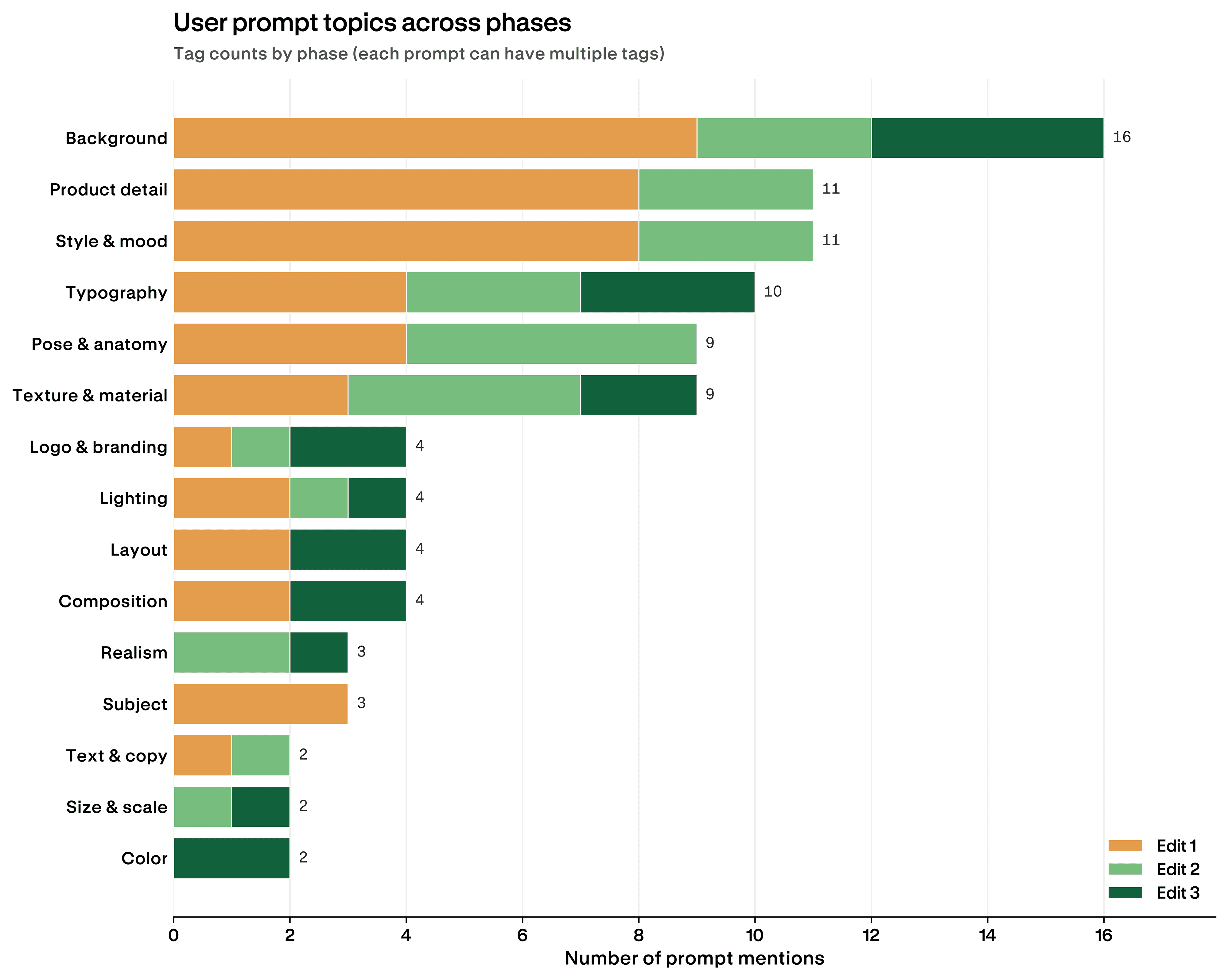
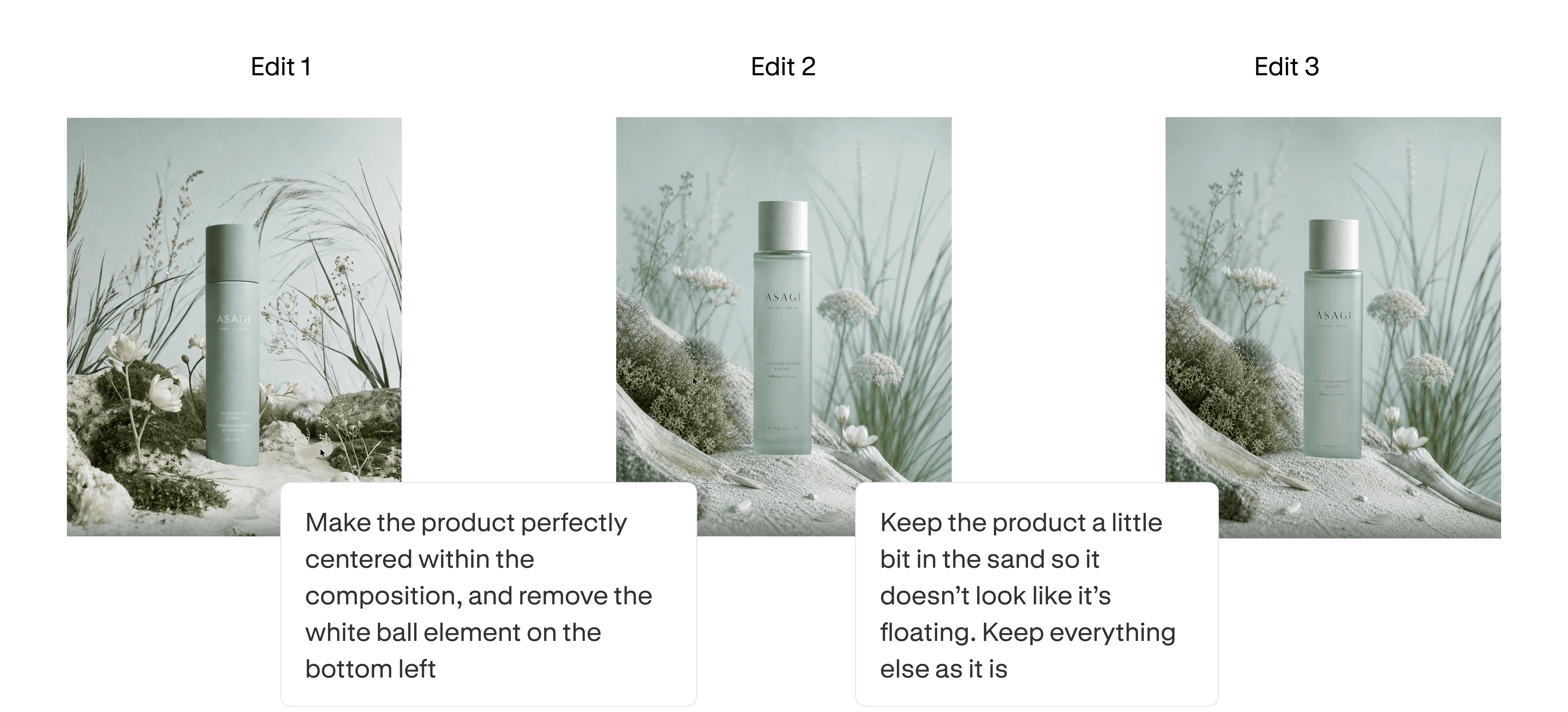
Two topics never go away:
- Background is the #1 ask at every phase, 16 mentions total. The same dimension flagged as GPT's relative weak spot in the Rollout.
- Typography stretches across all three edits, the only major topic designers keep returning to until it's right. That's why typography's "no issues" rate climbs from 33% to 59% with iteration. Designers force the fix themselves.
Where designers go when GPT runs out
Of the 41 sessions by 7 designers, 15 sessions ended with a generation the designer would present to a client. But "presentable to a client" didn't mean "ready to ship," because 10 of those 15 still moved to Photoshop, Illustrator, or Figma before the asset could go out. Only 5 of the sessions produced a shippable asset from GPT alone.
The remaining 26 sessions never reached client-ready at all, and 2 of those handed off to another tool to fix what GPT couldn't.
The pattern lines up with what designers asked for in Edit 3: logos, layout, composition, color. Last-mile polish, and precisely the work GPT couldn't deliver reliably.
Across all 41 sessions, transcripts surface the same five tools:
- Photoshop (most-mentioned): alignment, selective remove, AI cleanup.
- Adobe Illustrator: vector polish and structural fixes.
- Figma: typography, brand elements, final asset assembly.
- Pinterest and Google Images: visual references, run in parallel.
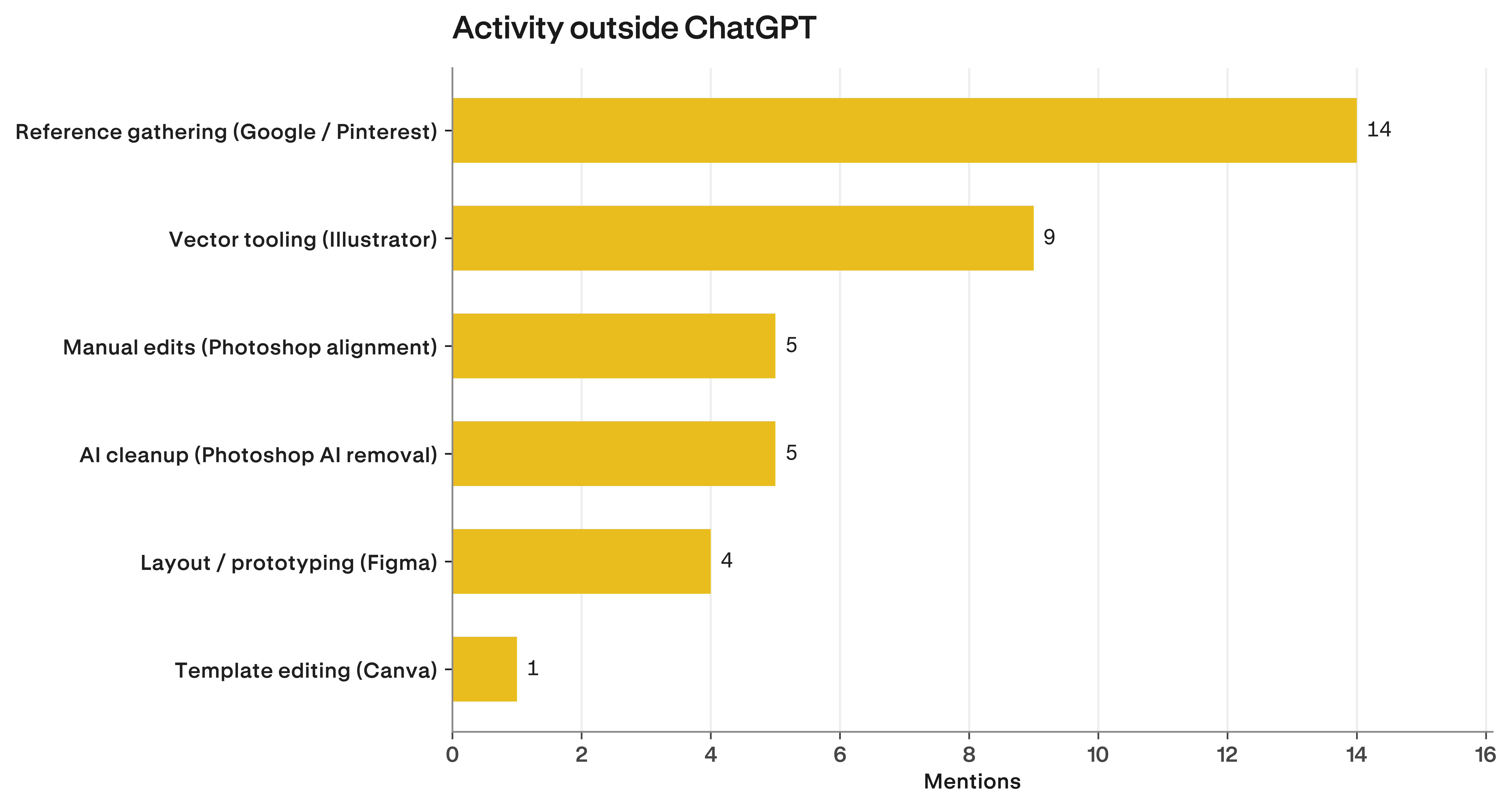
A Studio Citrine brief made it concrete. After 8 minutes 43 seconds and three iterations inside ChatGPT, the designer landed on a generation they approved: "yes, present to client." But the asset wasn't shippable yet. They moved to Photoshop to remove the background, and finally to Figma for typography and brand assembly, all before the work could go out.
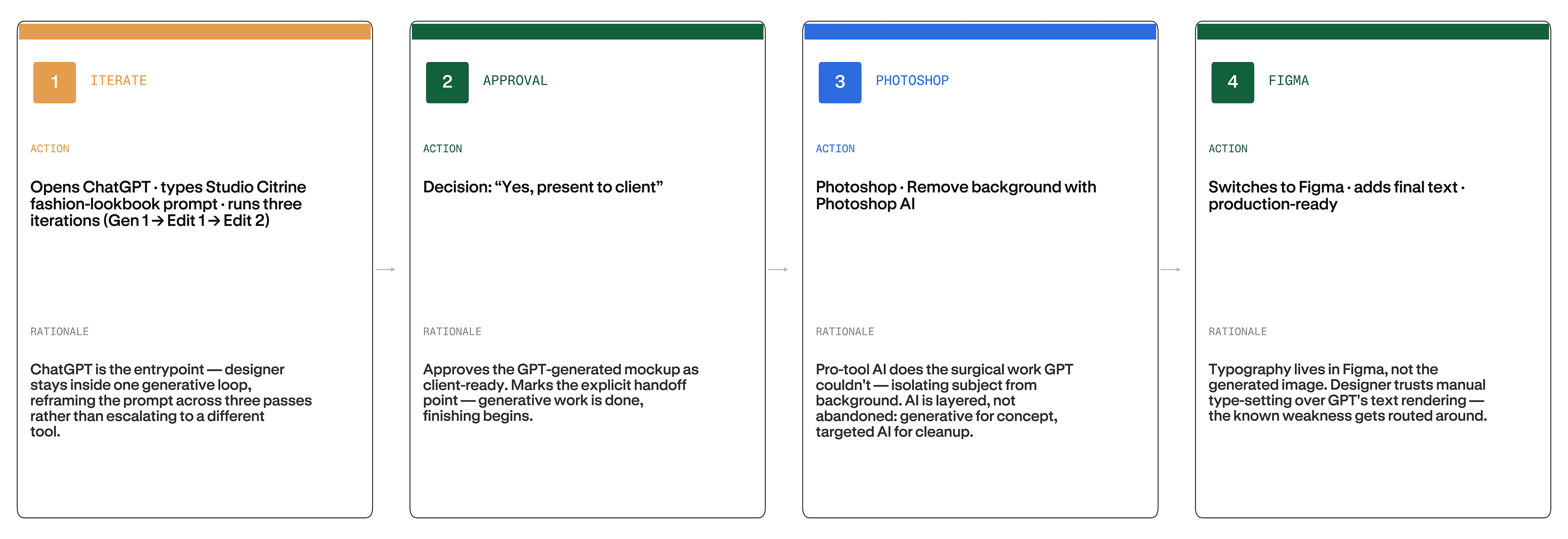
The generative model handled the concept. The pro tools handled everything that needed precision the model couldn't deliver.
The verdict
GPT Image 2 delivers on the easy half of OpenAI's claim. It hits a strong concept fast, handles dense compositions and stylistic constraints, and lets designers iterate without leaving the chat window. Production readiness is where the Rollout exposes the gap. Prompt adherence regresses by Edit 3. Realism flatlines in the low 60s. Background and typography never stop demanding attention. Only 5 of 41 sessions shipped from GPT alone, while the other 10 client-presentable generations still moved through Photoshop, Illustrator, or Figma before they could go out.
The smartest creative workflow in 2026 knows when to hand off. Use ChatGPT Images 2.0 for concept, composition, and the first two rounds of editing, where iteration still pays. By Edit 3, when prompt adherence starts to drift and the asks turn into logo placement, color, and pixel-level fixes, you've left the model's strength zone. Take anatomy and background work to Photoshop. Take typography and brand assembly to Figma. The model gets you to a concept fast, and the pro stack gets you to a shippable asset.
Methodology
To test this, we selected six campaign types to stress the visual dimensions OpenAI highlighted in the GPT Image 2 launch: small text and iconography, dense compositions, UI elements, and subtle stylistic constraints. The six briefs: Studio Citrine for realism and texture, Sonic Collective for typography, iconography, and dense layouts, Ridge for dense layouts and small text, ASAGI for subtle stylistic constraints and brand mood, Kinetix for depth of field and fine grain control, and Alpine for realism and texture.
Seven designers were given all six fictional campaign briefs and asked to use GPT Image 2 as their primary tool. Each session followed the same pattern: an initial generation, followed by three rounds of edits (Edit 1, Edit 2, Edit 3). After the third edit, designers could either continue in ChatGPT or move to a tool of their choice.
Sessions were recorded end-to-end using Rollout, Contra Labs' session-capture tool. Rollout records the screen, video, audio, mouse trails, clicks, and keyboard input, including everything designers did after they left ChatGPT.
Each generation was flagged for errors by the evaluators on five dimensions:
- Typography: incorrect or incoherent copy, broken text formatting, illegible font, lacking contrast, not readable, or no issues.
- Prompt Adherence: hallucinations, omissions, inaccuracies, or no issues.
- Realism and Physics: unnatural textures, broken object or body physics, impossible light or shadow directions, or no issues.
- Modernity and Trend: dated font, dated color scheme, dated imagery, dated graphic asset styles, or no issues.
- Color and Lighting: inconsistent palette, incorrect shades, clashing colors, or no issues.
During analysis, each prompt was tagged using 16 categories (background, typography, pose, texture, etc.) to surface what designers were trying to change at each phase.
How we ran this study → Methodology