

Our first piece looked at prompt shape behind Firefly's strongest first-pass outputs. The outputs that reached production-ready had something in common: designers gave Firefly physical direction. This piece stays in the middle of the workflow: what happens when designers try to refine the work inside Firefly before leaving for Photoshop.
Adobe's pitch for Edit is straightforward. Select a region, describe the fix, and keep the rest of the frame intact. That is the promise this article tests.
Contra Labs ran Firefly Edit through eight targeted still-image edits, one Hero edit and one Social edit in each of four sessions. Firefly cleanly resolved the requested issue once. Five attempts were partial. In those cases, the edit moved in the right direction, but missed a production constraint, changed more than the target area, or introduced a new issue while solving the named one. Two attempts did not resolve the target issue.
Most edits landed halfway
The Edit section covered only still deliverables: Hero and Social. There were eight targeted Edit attempts total: one Hero edit and one Social edit per session.
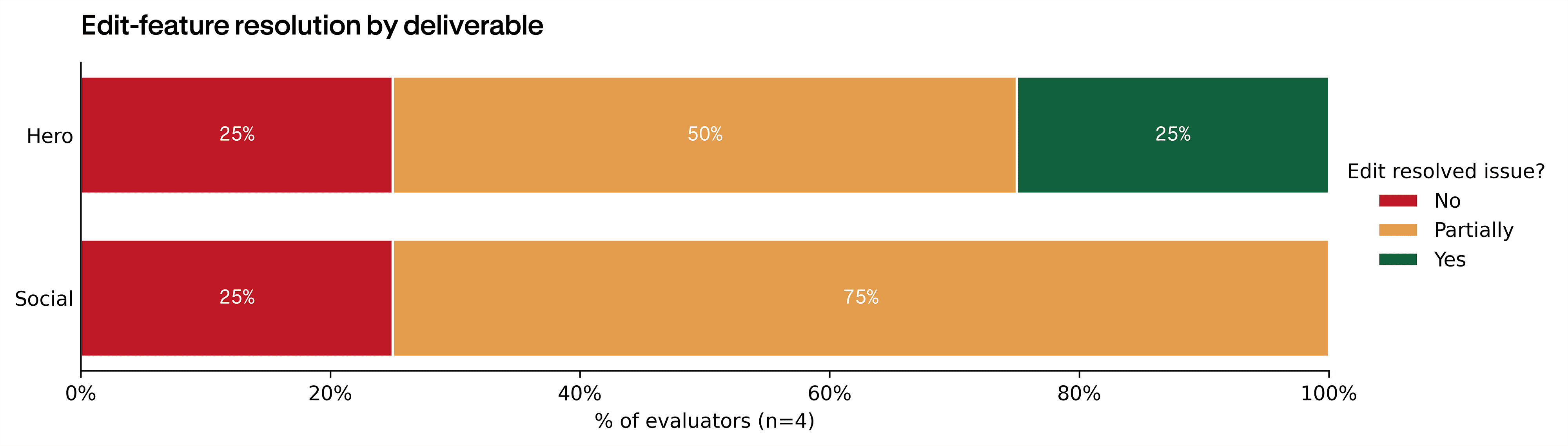
- Hero: 1 Yes, 2 Partial, 1 No.
- Social: 0 Yes, 3 Partial, 1 No.
The clean-resolution rate was low, but the more useful finding is how consistent the partial outcomes were. Firefly often moved in the right direction. It just did not hold the rest of the image still enough to treat the result as production-safe by default.
Why "partial" did not mean failure
The partial outcomes were not vague middle scores. In most cases, Firefly understood the main request. The problem was that the request carried production constraints the model did not see. Keep the product visible. Keep the crop stable. Keep the face consistent. Do not add something new.
The partials fell into four patterns:
- The target changed, but the hierarchy changed too. The edit landed, but a key element lost prominence in the frame.
- The target changed, but a production detail stayed wrong. The visible problem moved. A secondary attribute like shadow or lighting did not.
- The target changed, but identity or pose moved with it. The correction applied, but facial features or body position shifted enough to need another pass.
- The target changed, but a new artifact appeared. The edit resolved one issue and left behind something that was not in the original image.
That is more encouraging than the numbers suggest. Firefly can read the instruction. What it does not yet do well is hold the rest of the image still while executing it. The Hero and Social sections below walk through specific examples from each pattern.
Hero edits: the win came from a contained object fix
Hero was the stronger Edit surface. It produced the study's only clean resolution: one Hero edit was coded Yes, two landed as Partial, and one landed as No.
The clean Hero example shows the best version of the workflow. The edit asked Firefly to remove distracting objects and age the tray-holding hand:
Please age the hand of the person holding the tray by 10 years. The hand must be similar to a man in his late 50's. Remove the glass and wooden box.
The result did what the prompt asked for. (The before and after images also reflect a successful earlier iteration that moved the third hand to come from the left of the frame. That change preceded this edit.)
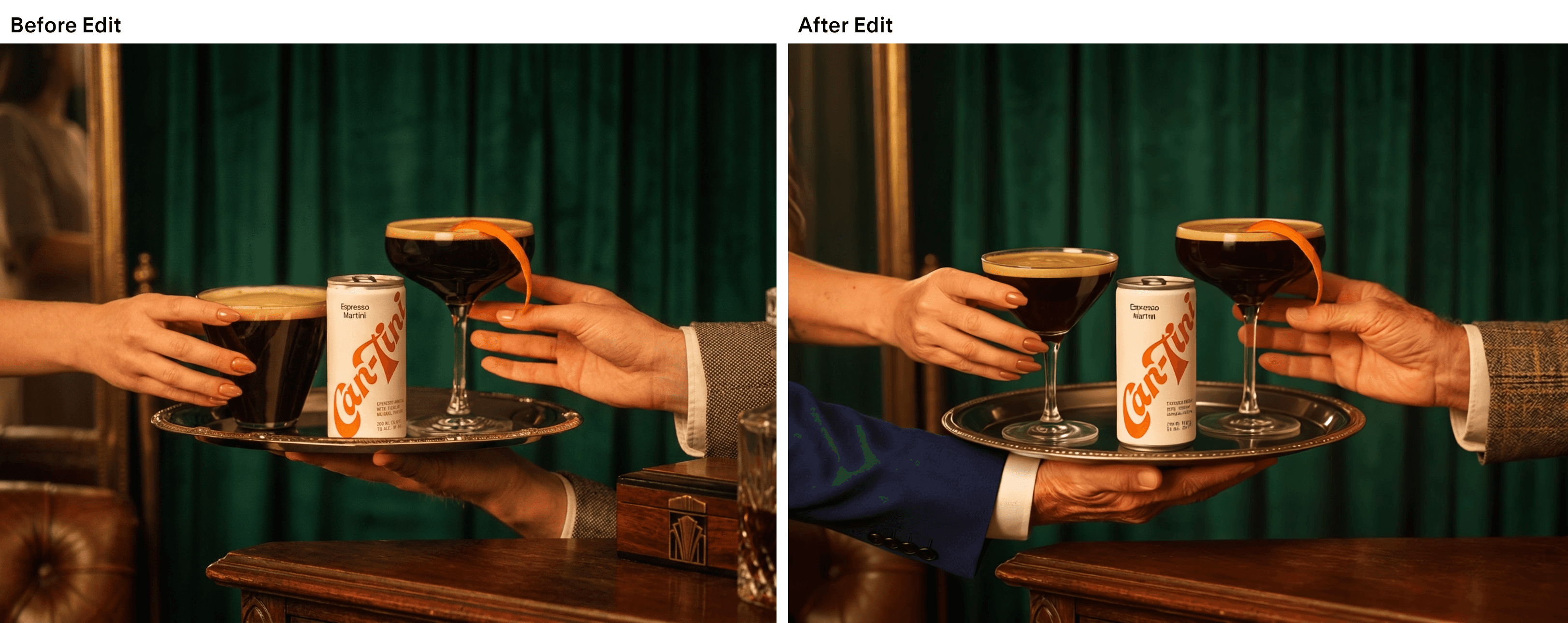
Edit can work when the request is concrete, local, and visually bounded. The partial Hero examples show what still needs improvement. In one partial case, the requested lighting or shadow change did not land cleanly. In another, the composition moved closer to the target, but the product became too secondary in the frame. The pattern was constraint drift. Firefly read the prompt, made the visible change, and let something else shift while doing it.
Social edits: the frame is the deliverable
Social was less forgiving. None of the four Social edits fully resolved cleanly: three were coded Partial and one was coded No.
The Social pattern is stricter because a social asset has less slack. Framing, crop, typography, product placement, and reference-image behavior ARE the deliverable. When Edit shifts any of those while addressing the selected region, the output can feel directionally improved and still fail the job.
The transcripts and visuals show two versions of the same control problem. In one Social attempt, the Edit request was narrow:
Regenerate the eyes, make the look to the right.
Firefly did move the gaze, but the edit still carried "the same issue with the format and the reference image," and the eyes "still need a little bit more tweaking."
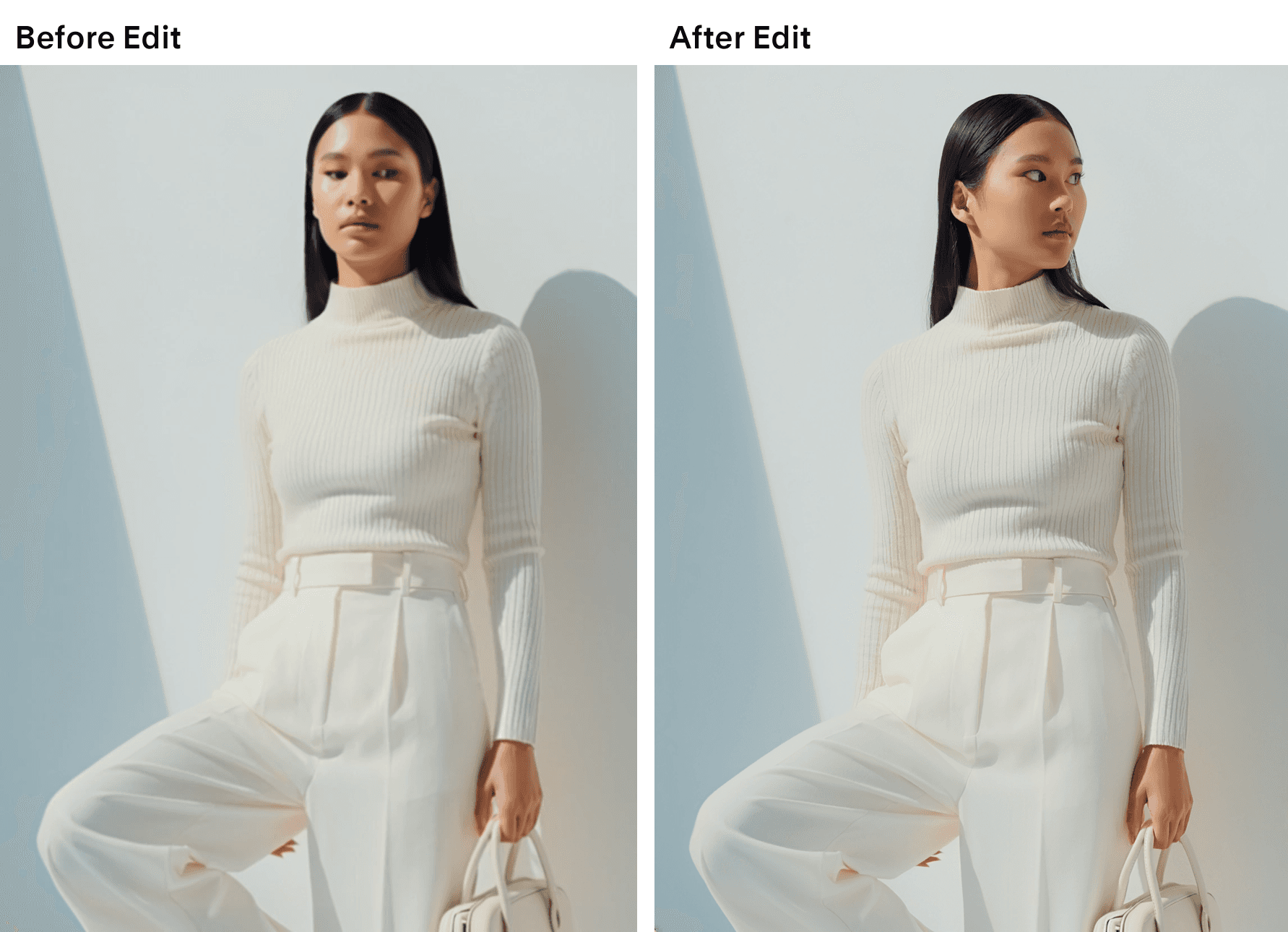
A separate Social attempt shows the same pattern through composition instead of anatomy. The evaluator was trying to force a vertical story format while preserving identity and product details. Firefly moved closer to the requested format, but introduced a new wall artifact: "I'm making another iteration because now it make, like, a weird thing that isn't in the wall." That is why Social produced partial outcomes instead of clean wins.
For Social, Edit can test whether a correction is directionally possible. To become a stronger finishing tool, it needs to preserve the non-target attributes that make a Social asset usable: crop, pose, face, product placement, and background stability.
Verdict
Firefly Edit works best when the request has one visible job. The clean Hero case proves the upside: remove these objects, age this hand, keep the rest of the image usable. Firefly did it.
The partials show the next product opportunity. Edit often understood the requested change, but it did not always understand what had to stay unchanged. A product became less prominent. A shadow stayed wrong. A new wall artifact appeared while the format moved closer to the brief.
That is a fixable problem. The next product win is constraint control. Lock the surrounding area by default, preserve identity and crop unless asked otherwise, and make the selected region the only place the image is allowed to move.
The practical read is positive but specific. Use Edit now for exploratory regional changes and contained object fixes. To make it a finishing tool, Adobe needs to make "do not change the rest" as reliable as the edit itself.
Methodology
The study ran four sessions. Each session followed the same three-deliverable structure: a Hero still, a Social still, and a 5-second Social video cut. This article analyzes only the Edit section of the experiment: one targeted Edit-feature attempt on each still deliverable, for 8 Edit attempts across the panel.
Each Edit attempt was coded into one of three outcomes: Yes (targeted issue cleared with no observable change to the rest of the scene), Partial (targeted issue cleared but with changes outside the requested region, or partial resolution), and No (targeted issue not cleared).
All sessions were captured on Rollout, Contra Labs' session-capture tool, with screen, audio, narration, mouse, and keyboard input retained for the full session length, in and out of the Firefly app.
Limitations
Feedback was self-reported during live sessions, carrying the usual self-assessment and on-camera bias. The sample is small (n=4 sessions, 8 Edit attempts) and should be treated as directional, not calibrated. Brief-specific effects cannot be fully separated from Firefly's general behavior. The repeated pattern across the panel was still clear: Edit often moved the requested region, but cleanly preserving the surrounding image was inconsistent.
How we ran this study → Methodology