

In Adobe Firefly, one video prompt in the whole study got to production-ready on the first pass.
Adobe positioned Firefly 5 around editing. The launch framed prompt-based and layered editing as the model's signature capabilities: point at a region, describe the change, apply it without regenerating the rest. Adobe's pitch was that Firefly now brings the "power of Photoshop" inside Firefly itself, with granular control over generated images so creators don't have to modify entire prompts and start over.
We ran four working designers through the same three-deliverable structure (Hero still, Social still, 5-second Social video) on briefs from their own client work. Most outputs didn't reach production-ready. The ones that did had something in common.
The model handled lighting briefs with the kind of fluency that drew unprompted praise, rendered legible text on a Social still, and produced one clean video with believable cloth physics on the first generation. What separated the outputs that shipped from the ones that didn't came down to the prompt.
The prompts that landed
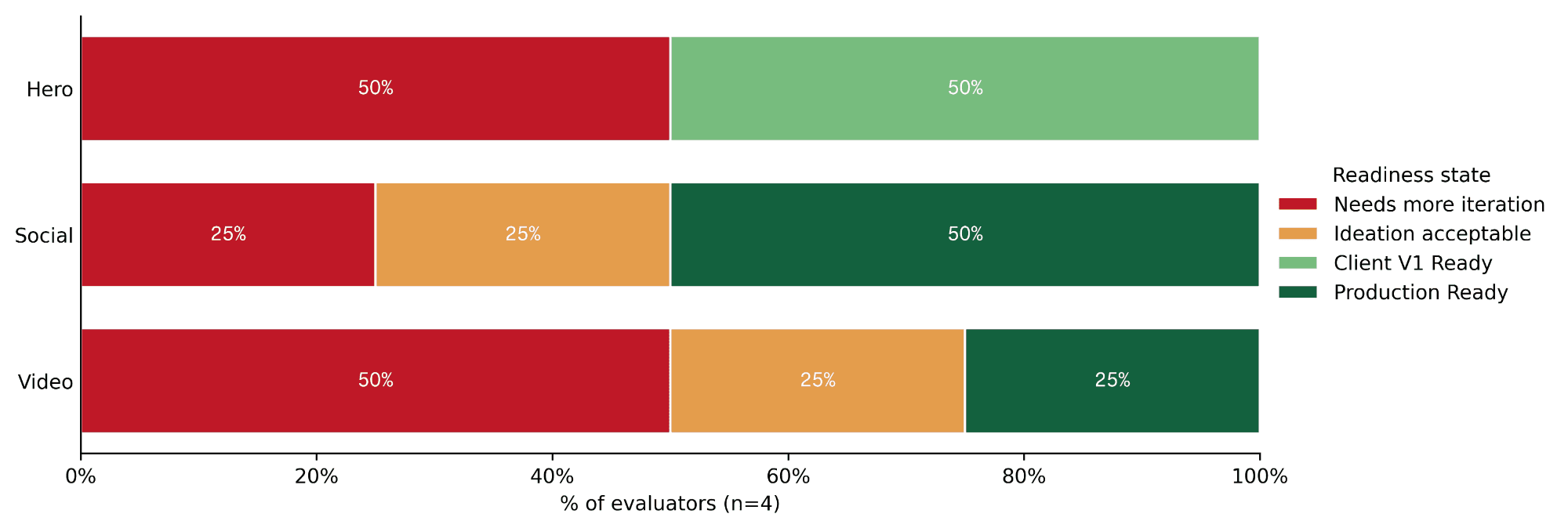
Only one prompt across all four sessions produced a video that was production-ready on the first pass. The designer gave Firefly physical direction: where the model starts, how she moves, where the camera sits, and when she leaves the frame.
Make the model move out of the wall, towards the camera, and then to the right side, getting out of focus of the camera. The model walks steadily but slowly. Camera stays still.
The panel's reaction was immediate. "The pleats move perfectly fine. Physics looks great. Surprised."
The same pattern showed up on Social. Two of the four social stills were marked production-ready (meaning ready to ship to a client without further work), and three of the four were at least good enough for an ideation deck. The prompt that landed described spatial layout and material behavior.
Please create a social forward image of the product as shown in the reference image, flat lay upon coffee beans. Scatter the coffee beans evenly and add water droplets to the product overall, creating the feeling of freshness. Add a long piece of orange rind that naturally falls across the tin and ends up on the coffee beans.
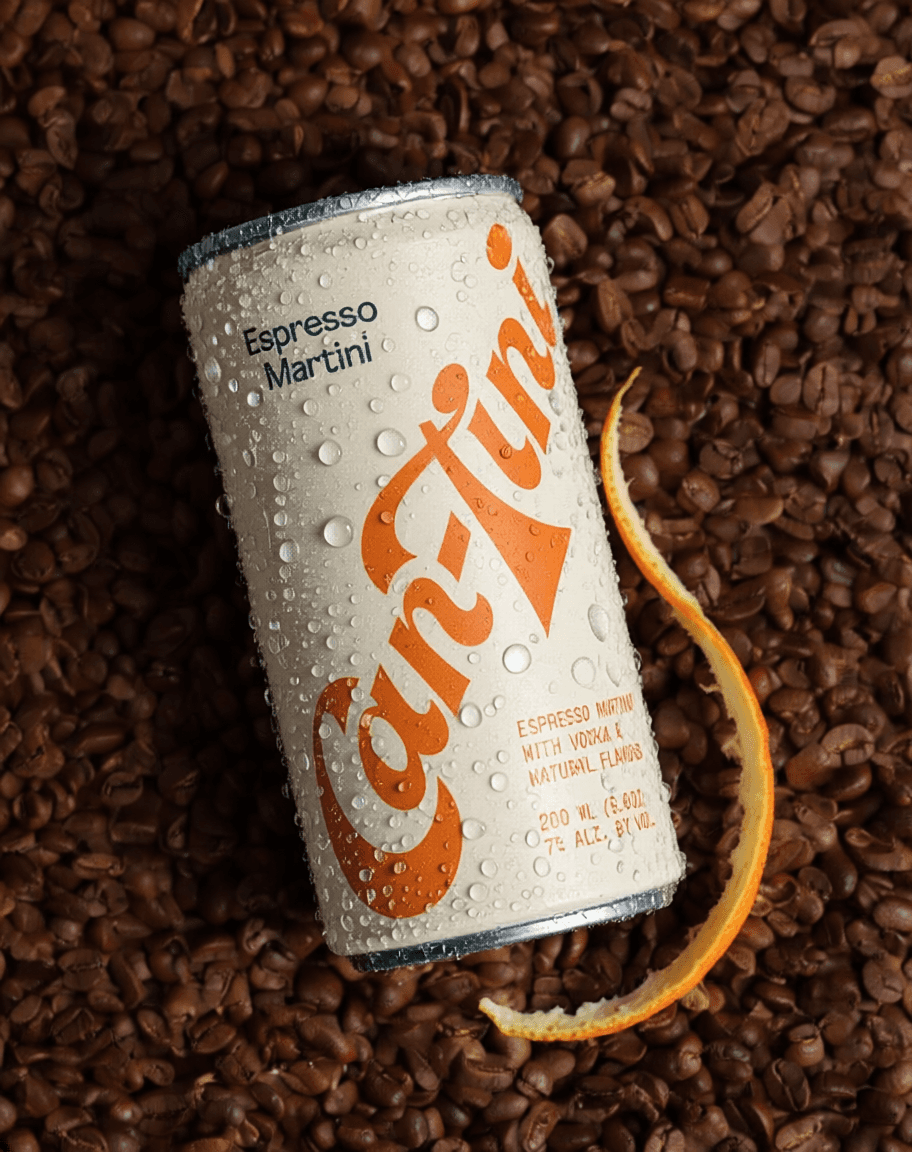
Across both deliverables, the prompts that reached production-ready shared a structure: they named physical objects, placed them in space, and described how they behave. Firefly responded to direction, not description.
Different deliverables, different failures
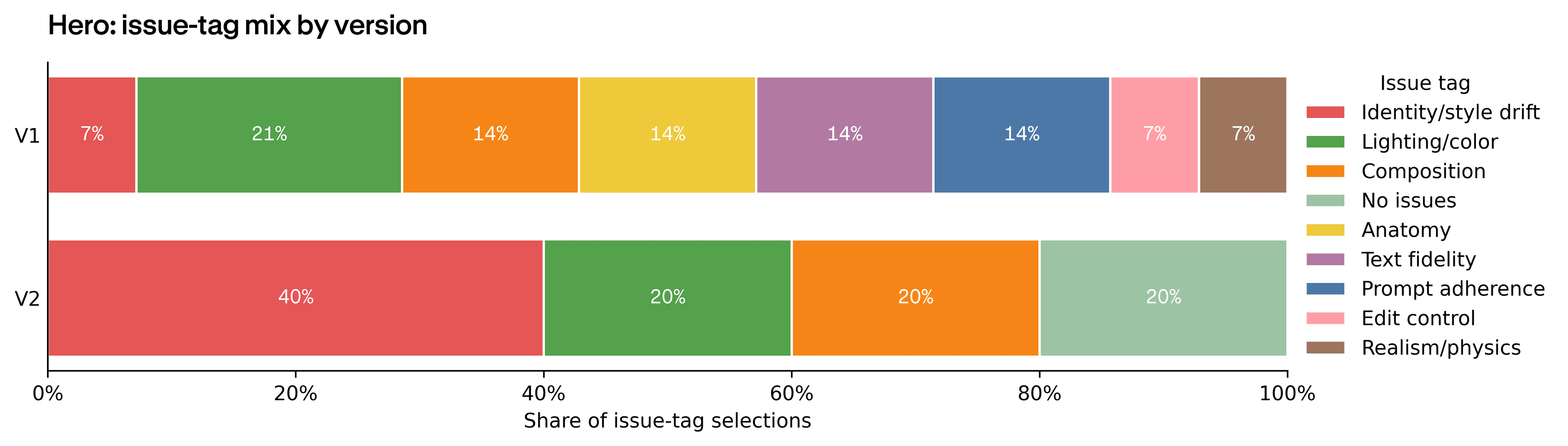
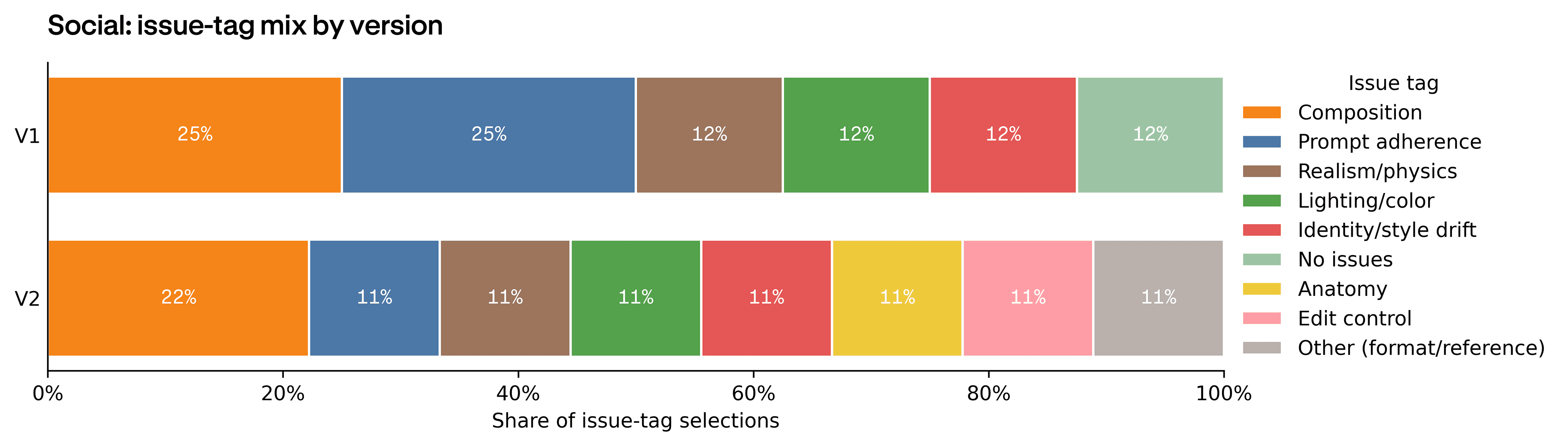
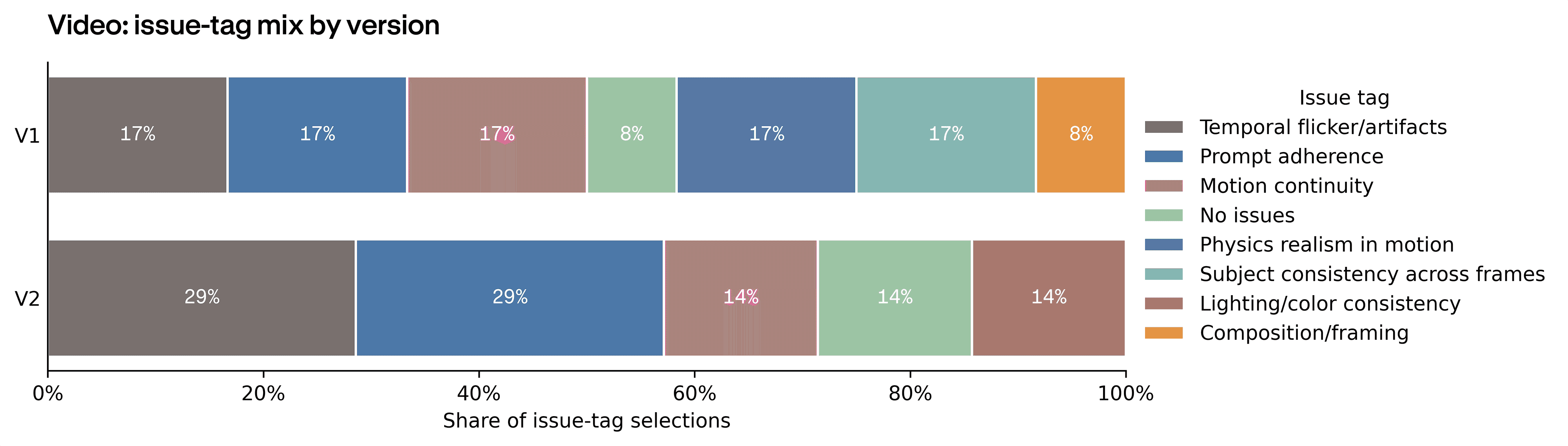
Each deliverable failed differently. Hero failures were photographic: lighting when it missed, identity drift (the model changing the subject's face or features between outputs), and composition. Social cleared the readiness bar more often than the other two deliverables, but its issue mix tells you where the work still landed: composition and prompt adherence took over, together accounting for 7 of 17 flagged Social issues. Video introduced a failure class the still deliverables didn't show: temporal flicker (frames visibly jumping), motion continuity (objects moving inconsistently between frames), subject consistency across frames, and physics in motion. Those motion-specific tags together carry roughly 60% of Video's issue mix.
That matters for how you use it. Firefly's strengths and weaknesses don't average out. The model that nails a Hero still misses on Social when format and copy enter the brief. The model that produces a clean first-pass video can't reliably edit the still that came before it.
Where they went instead
Given those failure shapes, the question is what designers did about them. They went to Photoshop.
Designers named Photoshop a combined 20 times across their sessions, specific about both why they opted to leave Firefly and what they intended to do once they were in Photoshop. Four overlapping use cases came up.
Quick fixes the model couldn't quite land
Small artifacts, lighting tweaks, minor anatomy cleanups. Fixes faster to make in Photoshop than to surface through another prompt.
This will be like really easy to fix in Photoshop. I mean, you could just, like, do it in two seconds.
Text overlay on Social
The Social brief includes copy on the asset. No designer trusted Firefly to set type, even when it rendered legible characters on the first pass.
I will go to Photoshop and overlay text, and make it look as natural as possible.
Cinematic grading and color work
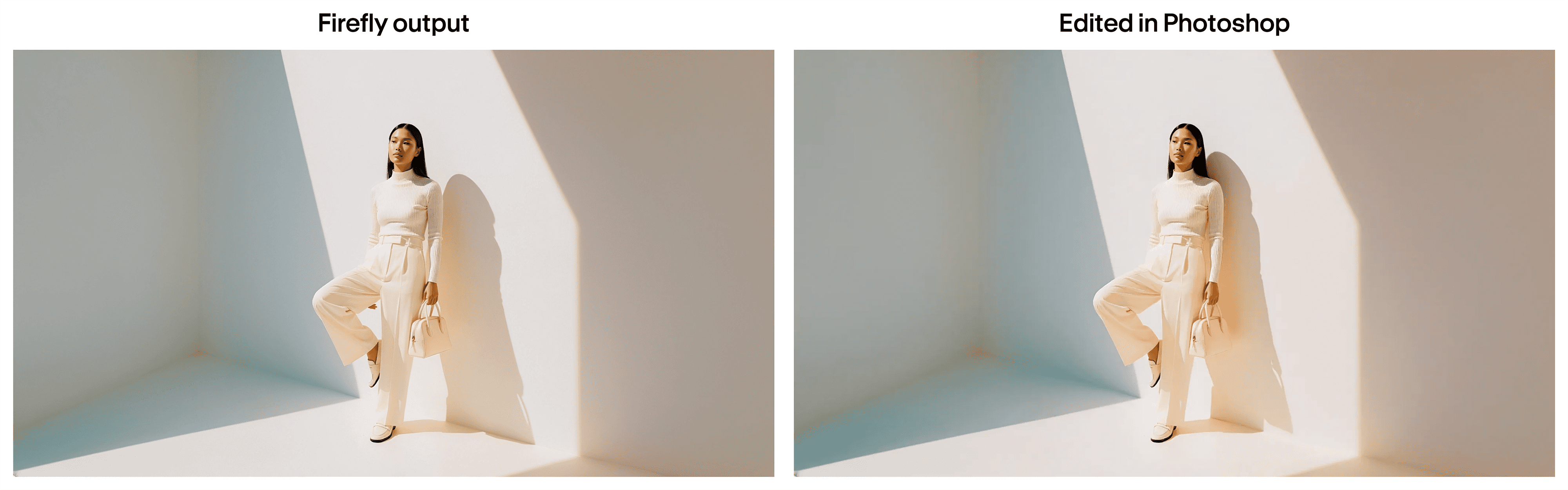
When the lighting was directionally right but not graded, designers reached for Photoshop rather than re-prompting.
Too much cinematic ask here 'cause I can just bring it into Photoshop for that.
Time-bounded escape from the re-prompting loop
Most repeated was Photoshop as a deliberate cutoff. One designer used it to bound how long she'd argue with Firefly on a single asset, calling it a pacing decision rather than a failure mode.
But again, this is already taking too long. I would just do this in Photoshop.
Designers were betting that ten minutes of Photoshop work would land more reliably than another fifteen minutes of re-prompting.
The handoff that showed up across the four sessions:
- Use Firefly for the structural moves: composition, lighting direction, spatial layout, and broad framing. That is where prompt effort lands most reliably.
- Hand off to Photoshop for the finish: final color and grading, type and copy, small artifact and anatomy cleanups, and anything format-specific that Firefly keeps missing on revision.
Plan the Photoshop pass into the session from the start.
The verdict
Firefly converts effort into output most reliably at the start of the work. The prompts that reached production-ready had one thing in common: they described physical direction, not aesthetic mood. Camera position, material behavior, spatial layout, how the subject moves through the frame. That is where prompt effort pays off in Firefly.
The first generation is where the model is strongest, and the prompts that landed show you how to make the most of it. From there, the asset finish happens in Photoshop, the way senior creatives already work. Firefly gets you to a strong starting frame.
Methodology
The study ran four sessions, one per designer. Each designer brought in a brief from their own client work, and worked it through the same three-deliverable structure: a Hero still, a Social still, and a 5-second Social video cut. Each designer worked in Adobe Firefly for 90 to 120 minutes under live screen, audio, and narration capture. Each designer produced two iterations per deliverable (an initial generation and one revision). Designers selected issue tags on each output, marked wow/failure reactions, and narrated rationale aloud.
All sessions were captured on Rollout, Contra Labs' session-capture tool, with screen, audio, narration, mouse, and keyboard input retained for the full session length, in and out of the Firefly app.
Limitations
Self-evaluation. Designers tagged their own outputs: they selected the issue tags, marked the wow and failure reactions, and narrated rationale aloud while on camera. Findings carry the usual self-assessment and on-camera bias. An outside reviewer looking at the same outputs would probably arrive at a different mix.
Sample size. The sample is small (n=4) and we treat these findings as directional, not calibrated. With four sessions, a single outlier can move the numbers; treat these as patterns worth investigating, not precise benchmarks.
Brief variation. Each designer brought their own client brief (spanning fashion, food & beverage, tech, and lifestyle), so brief-specific effects can't be fully separated from the tool's general behavior. What held across the panel, regardless of brief, was the gap between first-frame quality and where designers took the asset next.
How we ran this study → Methodology