

We pulled every prompt five working designers typed into Claude Design across one luxury landing-page brief. The data points the same direction in every session: the first prompt matters more than the fifteen that follow it.
Our first piece on Claude Design tested the output. The tool delivered the first draft fast, then stumbled when designers tried to push it further. Layout, color, and typography were the consistent failures, and designers settled on 40% in Claude, the rest in Figma.
This piece moves from output to input. Every prompt was coded for structure and intent. What follows: how five different openings produced five different ceilings, where regression starts, and why one designer wrote sixteen prompts and finished worse than they started.
The first prompt
Every session reached a moment where the design system was built, the components were generated, and the designer had to type the first thing on a page that didn't exist yet. The tool already had context: a brand, a palette, a component library the designer had just approved. The brief, reference imagery, and inspiration sat alongside it. What designers typed was the first instruction on top of all of that.
The shape is what carries the story. The opening is doing two things at once: a brief that sets context, audience, and aesthetic, and a directive that names what to build, what interactions to use, and what to avoid. That hybrid shape was the most specific opening of the five. It's one of four shapes designers used to open their sessions, and the variation in those shapes is where the story starts.
The five openings
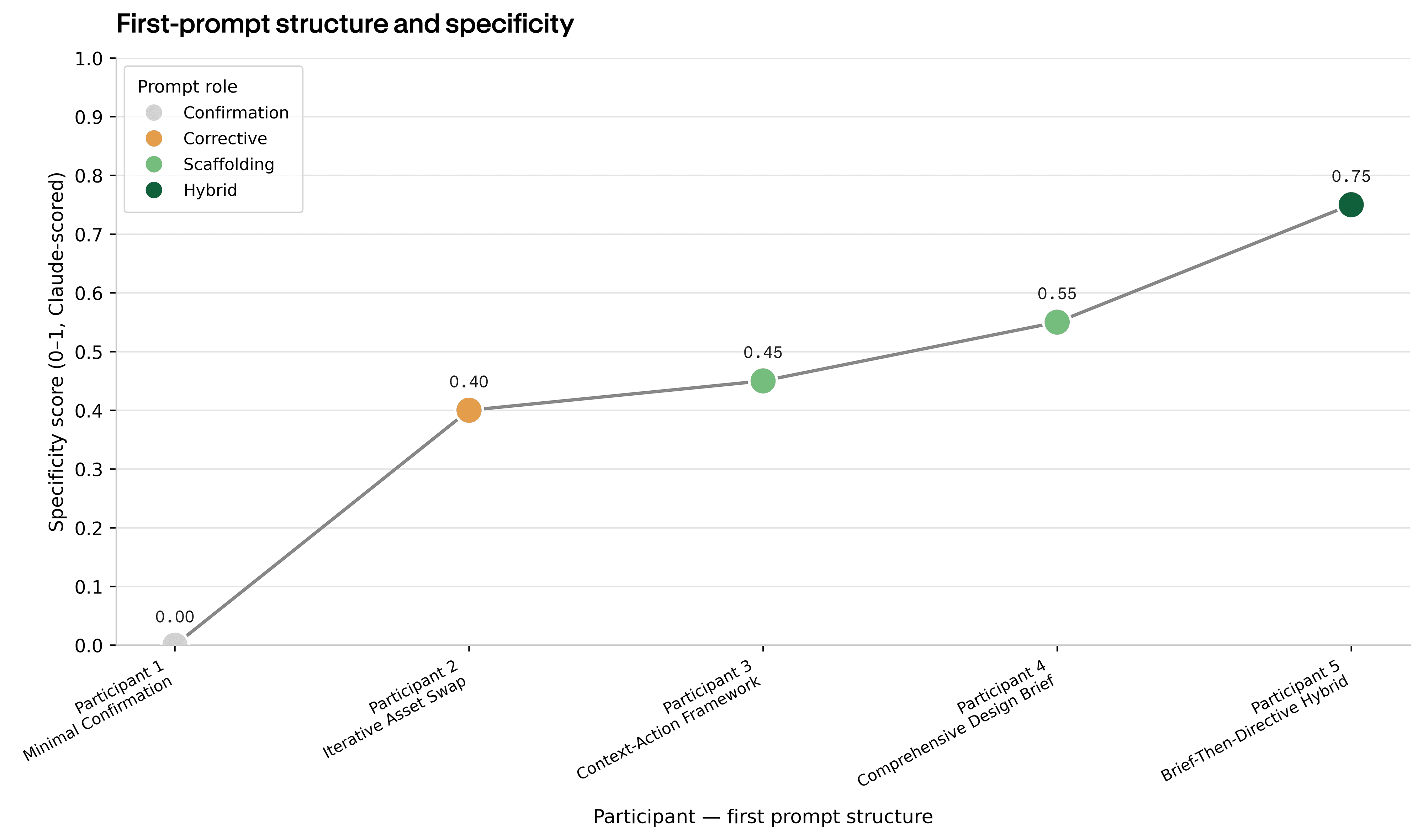
The Aetheon prompt above was Participant 5's, a Brief-Then-Directive Hybrid at 263 words. We scored each opening for specificity on a 0–1 scale: how many concrete design decisions the prompt fixed in place versus left to the tool. Participant 5's opening scored 0.75, the highest of the five, and was the only one to specify visual values from the design system the designer had just approved.
Participant 4 wrote nearly as much, 242 words, organized as a Comprehensive Design Brief with every category an agency document would include: role, overview, objective, audience, sections, visual system, interactions, aesthetic, and constraints. Participant 3 cut that scope in half: 161 words, a Context-Action Framework with project, audience, pain points, and a creation directive, but no visual or interaction specifics.
The other two openings looked nothing like briefs. Participant 2 wrote twelve words: a single corrective directive asking the tool to swap an asset on what was already on the screen. Participant 1 wrote one word, an affirmation: the Minimal Confirmation, accepting what the tool had produced and moving on.
What designers chose to include tells a clearer story than how specific they were. Every one of them included a project brief or task instruction in some form. Most named a target audience and a goal. But across all five openings, only Participant 5 specified visual values (exact references to the design system they'd already built). The rest assumed the tool would carry the system over. None of the five provided hex codes or pixel values in their first prompt, and none asked for a specific output format. The most consistent gap, even in the most comprehensive briefs, was the same one the first article identified from the other side: precision the tool was being asked to produce without being given any of its specifics.
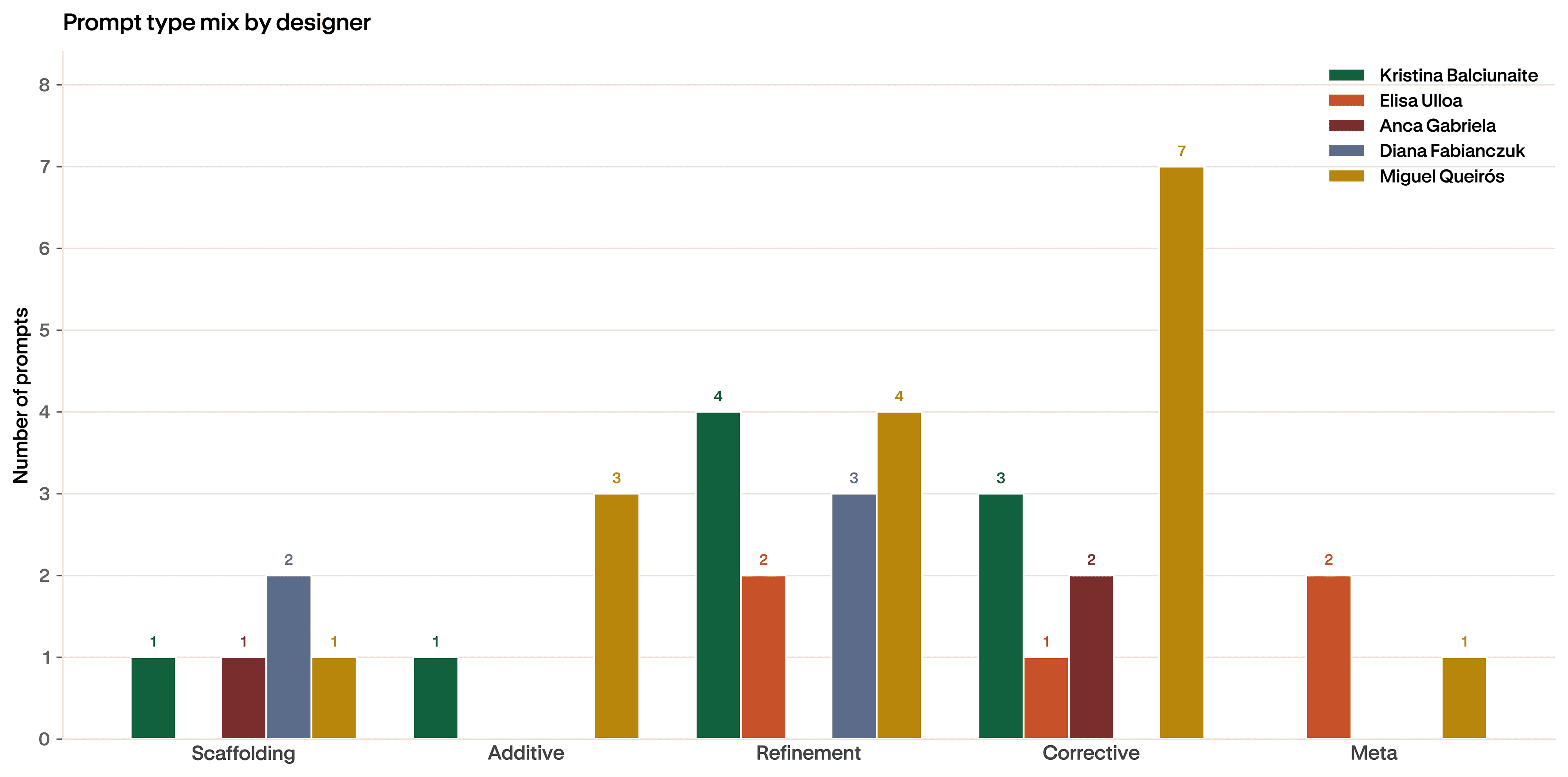
The five prompt categories describe what kind of move a designer made on any given turn. Scaffolding builds something new. Additive adds to what exists. Refinement adjusts. Corrective fixes what broke. Meta asks the tool to step back and reconsider.
No two designers used the same mix. Participant 4, who had written the second-most-comprehensive opening, lived almost entirely in refinement, five prompts adjusting what the tool had produced. Participant 5, the Aetheon designer, spread their session across every category, with a notable cluster of corrective prompts. Participant 1, the Minimal Confirmation opener, never wrote a refinement at all; their session was a small number of corrective and scaffolding moves and nothing else. Participant 2 made one corrective and stopped.
Two patterns hold across the variation. Refinement is the most common category overall, fourteen prompts across the five designers. Corrective is second, at eleven. Together they account for roughly two-thirds of everything anyone typed. Scaffolding, by contrast, was almost entirely a first-prompt behavior. Only one designer wrote a scaffolding prompt anywhere except the opening. The first prompt was the only time most designers stepped back and built; after that, they were adjusting and fixing what the tool returned.
Did opening well help?
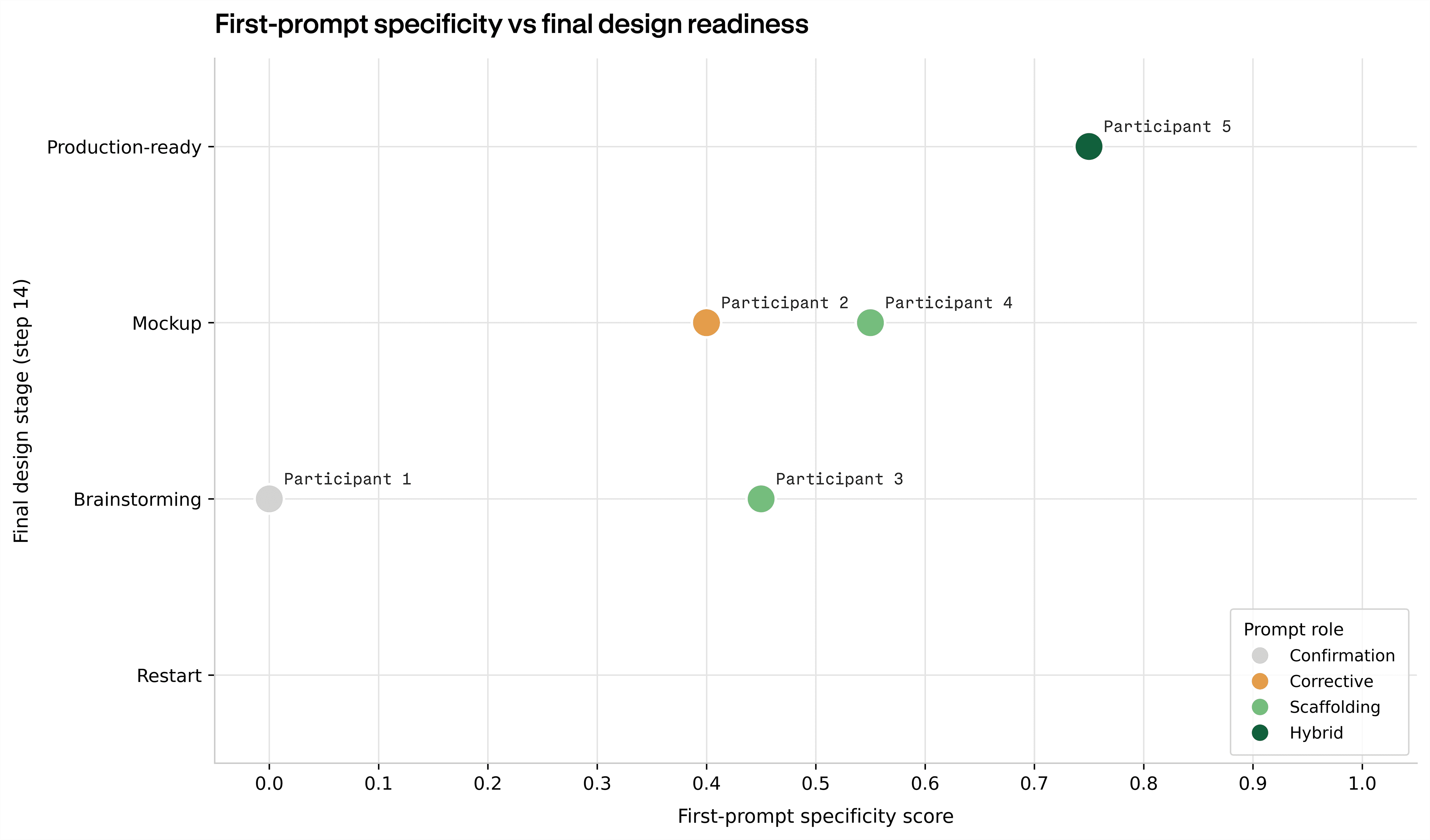
The two designers with the strongest opening moves (Participant 4's Comprehensive Design Brief and Participant 5's Brief-Then-Directive Hybrid) reached the two most finished outcomes, mockup and production-ready. The Minimal Confirmation opener landed in brainstorming. The Iterative Asset Swap landed at mockup, despite a twelve-word opening, by working with what the tool had already produced rather than rebuilding from scratch.
The pattern is directional. More structure in the opening correlated with more finished outputs, with one exception. Participant 3 opened with a real scaffolding prompt (middle of the pack on specificity, a real Context-Action Framework) and ended in brainstorming, the same outcome as the designer who'd opened with a single word. The contrast shows up in the work itself.
The session that proves it
Participant 3 is the most informative session we ran. The opening predicted a mockup or better. The session ended in brainstorming.
Across the session, Participant 3 wrote sixteen prompts, more than three times as many as any other designer. They kept going. They got more specific over time. Their average prompt by mid-session was more precise than their opening.
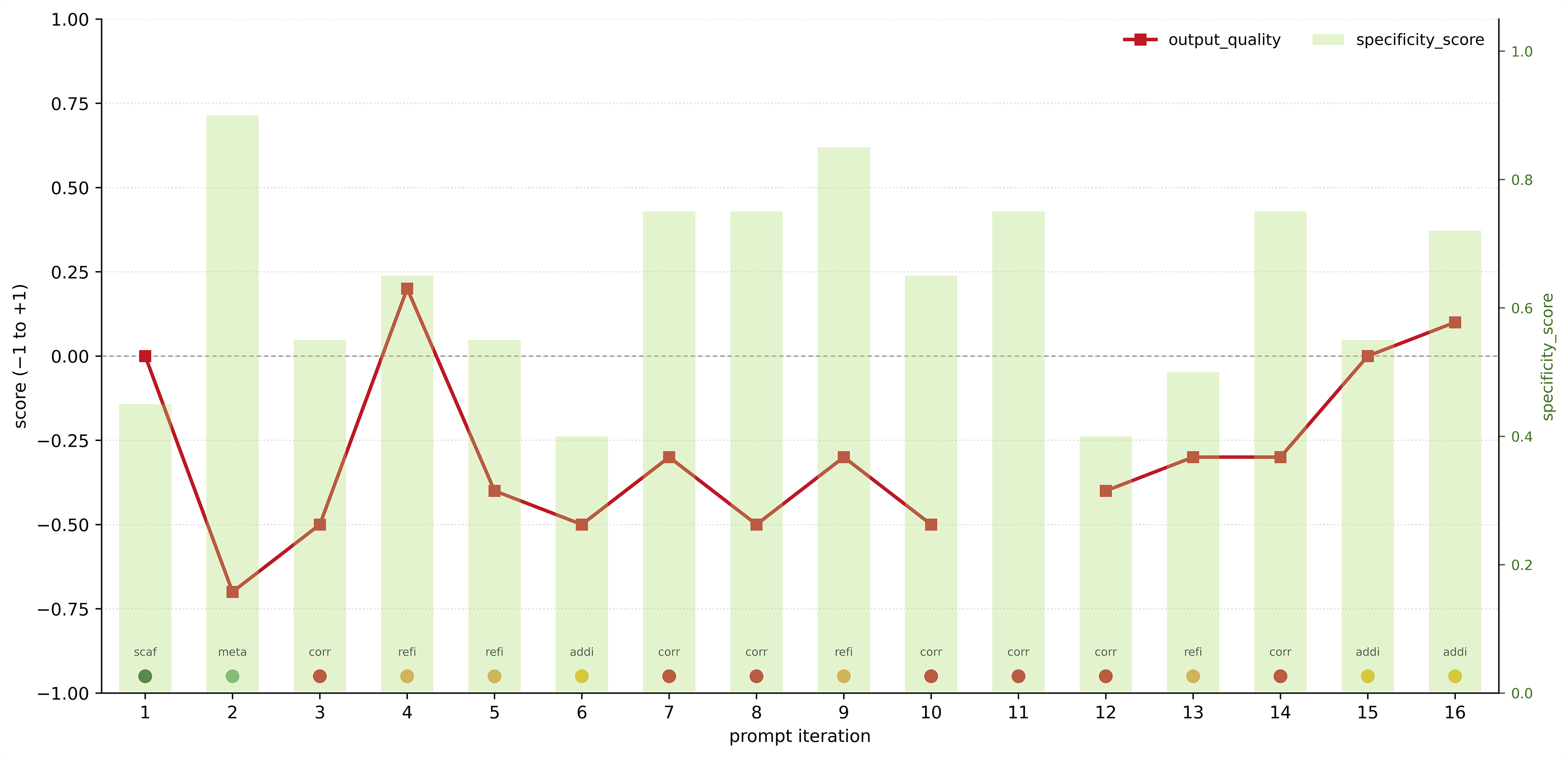
The red line is output quality, scored across each iteration on a −1 to +1 scale. It sits below zero for twelve of the sixteen prompts. The peak was a single refinement at iteration four, just above +0.2. The trough was prompt two, a meta prompt asking the tool to step back and reconsider, which pulled quality down to −0.7. The tool treated it as an instruction to discard: the structure from the opening prompt was lost, and the session never fully recovered. Every subsequent corrective was a fight to rebuild ground that had been there a prompt earlier.
Look at the prompt-role labels along the bottom. Eight of the sixteen prompts are corrective. Half of this designer's session was spent telling the tool to fix what it had broken. Refinements made up most of the rest. The only prompts that produced positive quality scores at the end were two additives, small accretions, late in the session, after the structural fight was already lost.
This is the regression story from the first article, observed at the resolution of a single session. Participant 3 kept going for sixteen rounds, climbing in specificity, and the quality score never crossed back into positive territory until the last two prompts, by which point the work had drifted far from the brief. The opening prompt sets the ceiling. What comes after determines whether the ceiling holds. In Participant 3's session, it didn't.
Verdict
The opening prompt is the most consequential move in a Claude Design session. The two designers who opened with structured briefs reached the two most finished outputs; the designer who opened with one word ended in brainstorming. The correlation isn't subtle.
But structure at the start doesn't survive iteration on its own. Refinement and corrective prompts made up roughly two-thirds of everything designers typed, and sessions regressed through those moves, even when designers kept trying. Participant 3 wrote sixteen prompts, got more specific over time, and finished worse than they started.
Three patterns worth carrying forward
- Specify visual values in the opening, even when the design system is already built. Only one designer did this, and it's the one who reached production-ready. The system you approved is not context the tool can be trusted to read on its own.
- Be cautious with meta prompts. The single largest quality drop in the study came from a prompt asking the tool to step back. Treat "reconsider" as a request to discard.
- Scaffolding belongs at the start. Only one designer wrote a scaffolding prompt anywhere except the opening. After the first move, the session is a refinement and correction game. Plan accordingly.
The open question is whether the regression we observed is a property of the tool or a property of how designers learn to prompt it. A second round, with the same designers and a different brief, would start to answer that.
Methodology
Five designers each ran a single session with Claude Design against the same client brief: a landing page for a fictional ultra-luxury desert resort called Aetheon. Each designer was given the brief, reference imagery, and candidate color palettes before the session began. They worked through Claude Design's standard flow (entering a brand name, uploading inspirational assets, generating a design system, and reviewing the components Claude Design produced) before writing their first prompt against the page itself.
Sessions were recorded end-to-end using Rollout, Contra Labs' session-capture tool. Rollout records the screen, video, audio, mouse trails, clicks, and keyboard input, including everything designers did inside and outside Claude Design.
We collected every prompt across every session and coded each one for structure and role using OpenAI's gpt-4o model applying a fixed rubric. First prompts were classified into five structural shapes: Minimal Confirmation, Iterative Asset Swap, Context-Action Framework, Comprehensive Design Brief, and Brief-Then-Directive Hybrid. All prompts across the session were classified into five categories of intent: scaffolding (build something new), additive (add to what exists), refinement (adjust), corrective (fix what broke), and meta (step back and reconsider). Each designer's final output was self-rated for design readiness on a four-point scale: restart, brainstorming, mockup, and production-ready.
Limitations
Feedback was self-reported from the same designers who produced the work, carrying the usual self-assessment bias. The sample is small, and we treat these findings as directional. Only one brief was tested, so brief-specific effects can't be cleanly separated from the tool's general behavior. The patterns, however, hold across designers and across edit rounds in the same direction: a strong system-level start, weak precision execution under iteration.
How we ran this study → Methodology