

The SF Standard ran a headline: “'Engineer' is so 2025. In AI land, everyone's a 'builder' now.” Figma's own 2025 report found 56% of non-designers are now performing design-centric tasks. The conclusion seems obvious. The tools have caught up, the role is dissolving, anyone can ship beautiful interfaces.
The interfaces all look the same. Give the same prompt to any of these tools and what comes back is the same left-rail sidebar, the same rounded card grid, the same indigo accent that's become the unofficial flag of AI-generated interfaces. Designers have started calling it “product slop.” The tools give you the average of what they've seen because nothing in the input asks them not to.
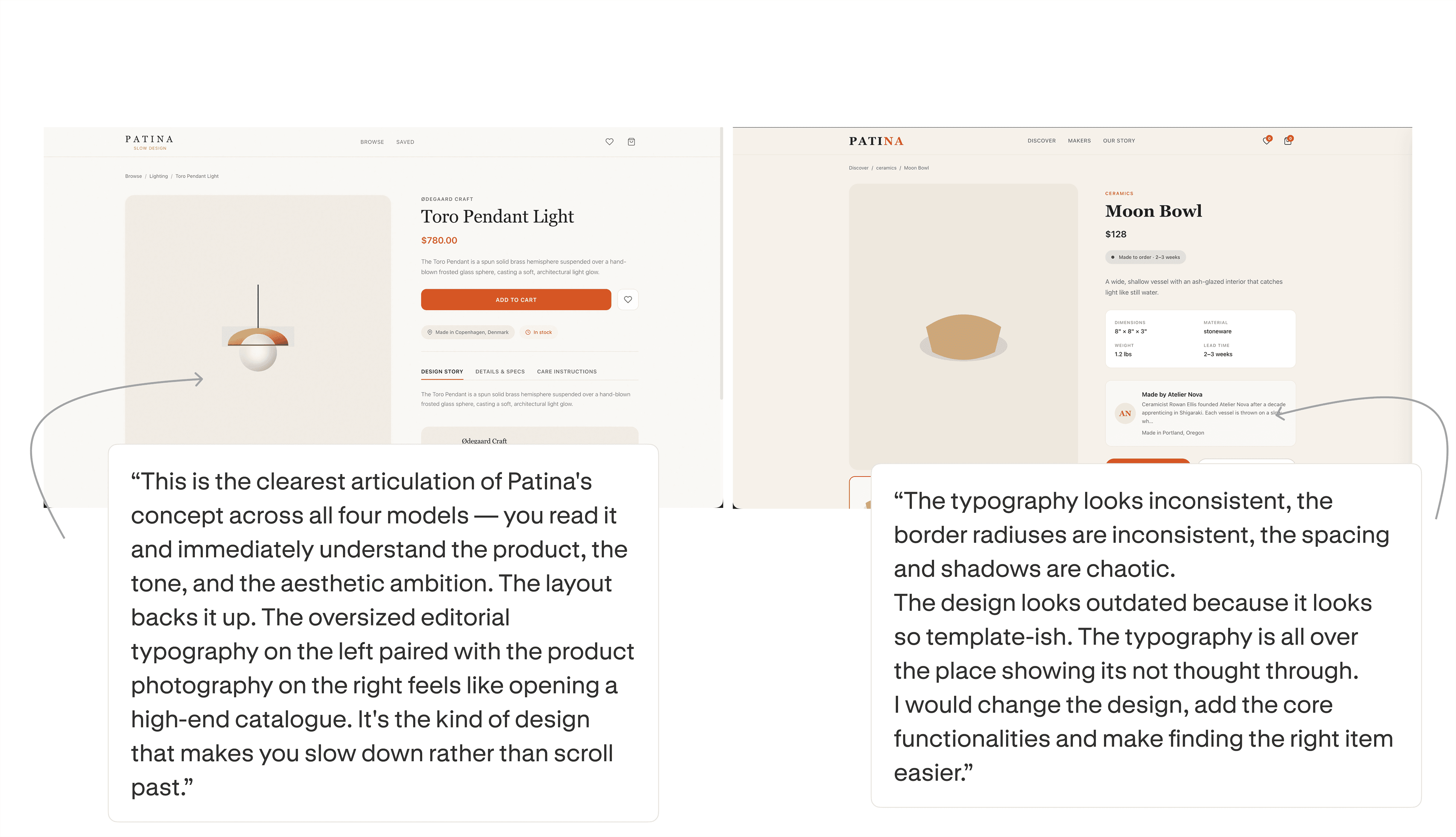
AI coding tools can produce design. The question is whether a designer would put their name on what comes back. We ran 24 outputs from Cursor, Claude Code, Codex, and Antigravity past five working designers in three rounds: blind tournament, individual ratings, then the one that decides everything. Would you present this to a client?
The answer split.
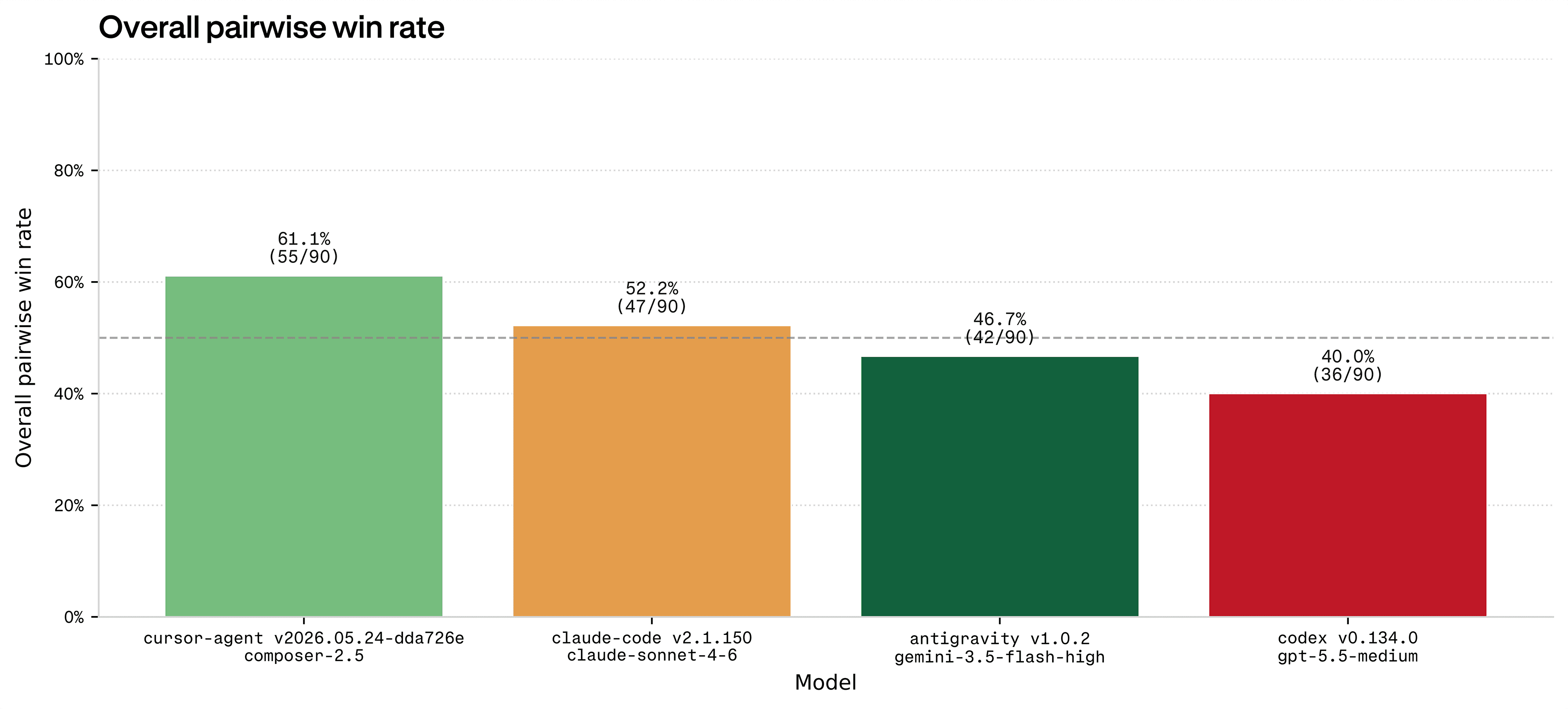
Cursor won the head-to-head tournament with about a 60% overall pairwise win rate and the highest Elo rating at 1575. In a side-by-side comparison, designers picked Cursor more often than any other tool. Claude Code came second at ~50%, Antigravity third at ~45%, and Codex last at ~40%.
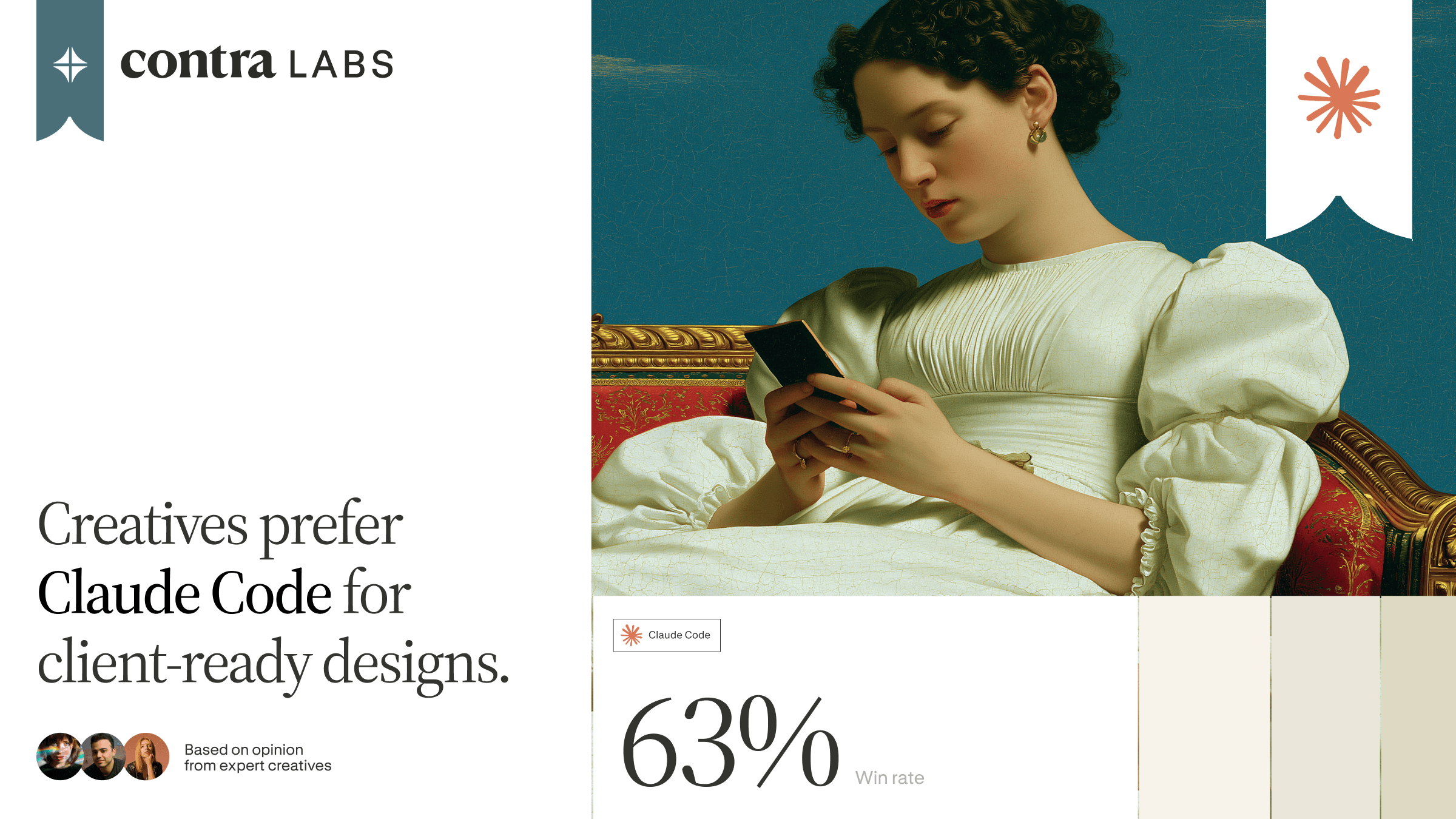
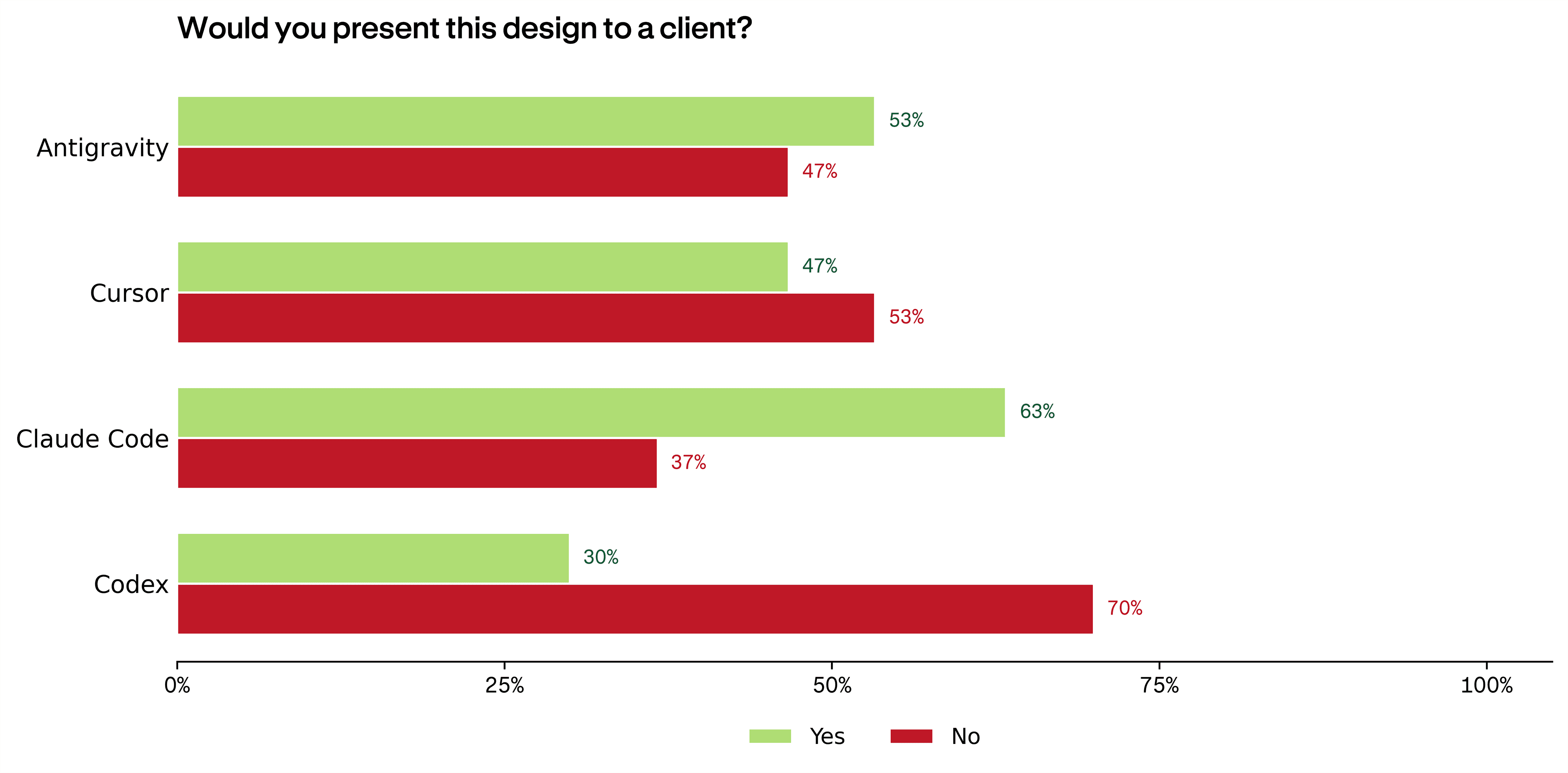
But when designers were asked whether they'd present the output to a client, Claude Code led at 63%. Antigravity followed at 53%. Cursor, the pairwise winner, dropped to 47%. And Codex landed at 30%. Designers declined to present it seven times out of ten.
The tool designers preferred to look at and the tool they'd trust with their name on it turned out to be different.
What wins side-by-side vs. what wins the room
The gap between pairwise preference and client readiness tells you something about how designers actually evaluate work. In a tournament, they're comparing surfaces: which layout feels tighter, which color palette reads better, which typography has more presence. Client readiness seems to be an entirely different filter, with designers weighing whether they can defend every decision in the output, and if there's anything that would make them lose credibility.
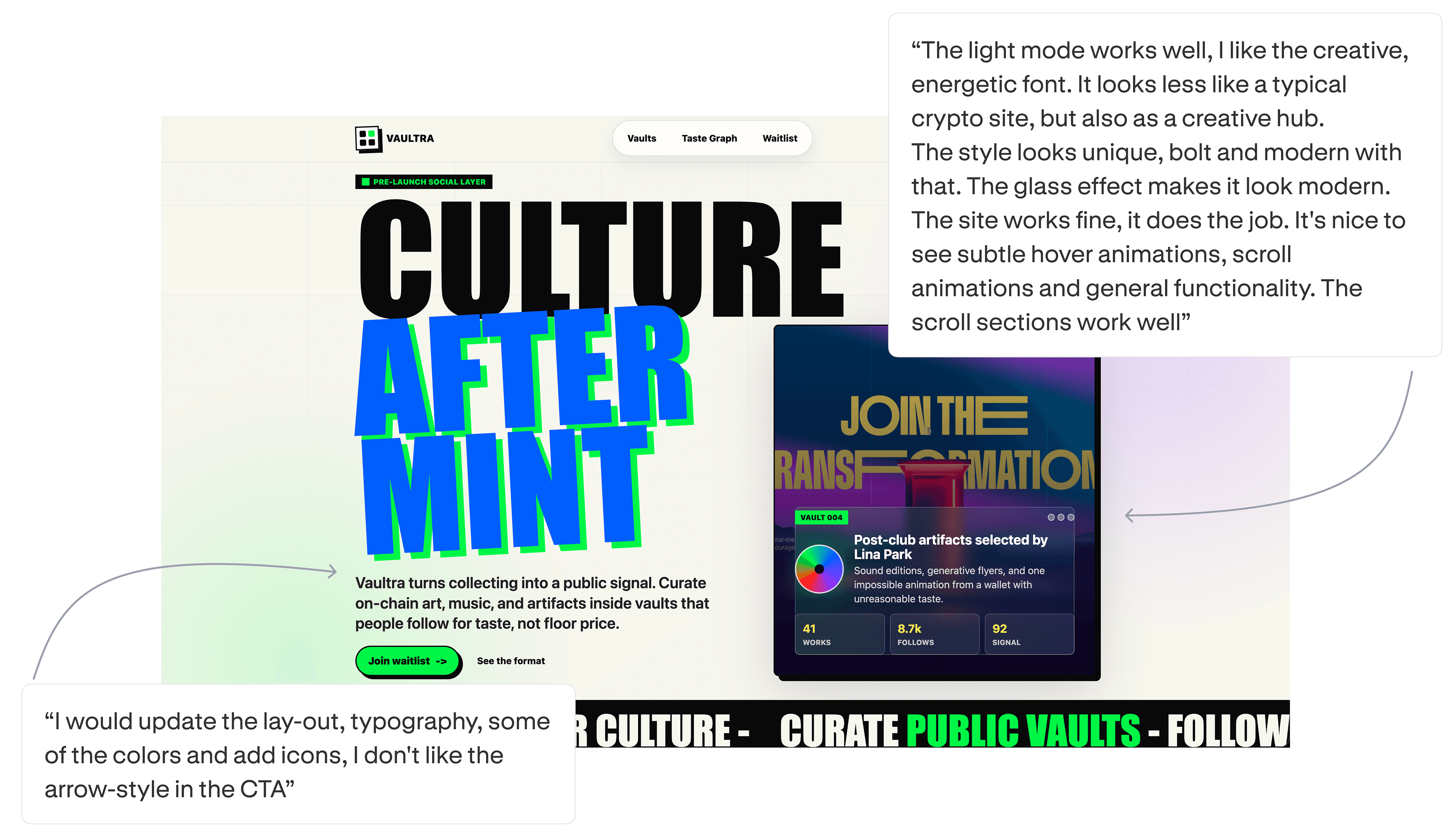
When designers explained why they ranked an output first, the reasons were dominated by usability and visual appeal. When they explained why they'd present something to a client, the reasons shifted toward layout, hierarchy, and whether the output felt like a real product rather than a template.
Designers scored outputs lower when they followed the brief but looked dated, and forgave trendy ones that drifted from it. Prompt adherence only got you in the door: outputs scoring below 2.5 on following the brief were called client-ready just 16% of the time. But once an output cleared that floor, how current it looked drove client readiness and perceived maturity more than fidelity to the brief did.
Landing pages, mobile apps, web apps. Three different contests
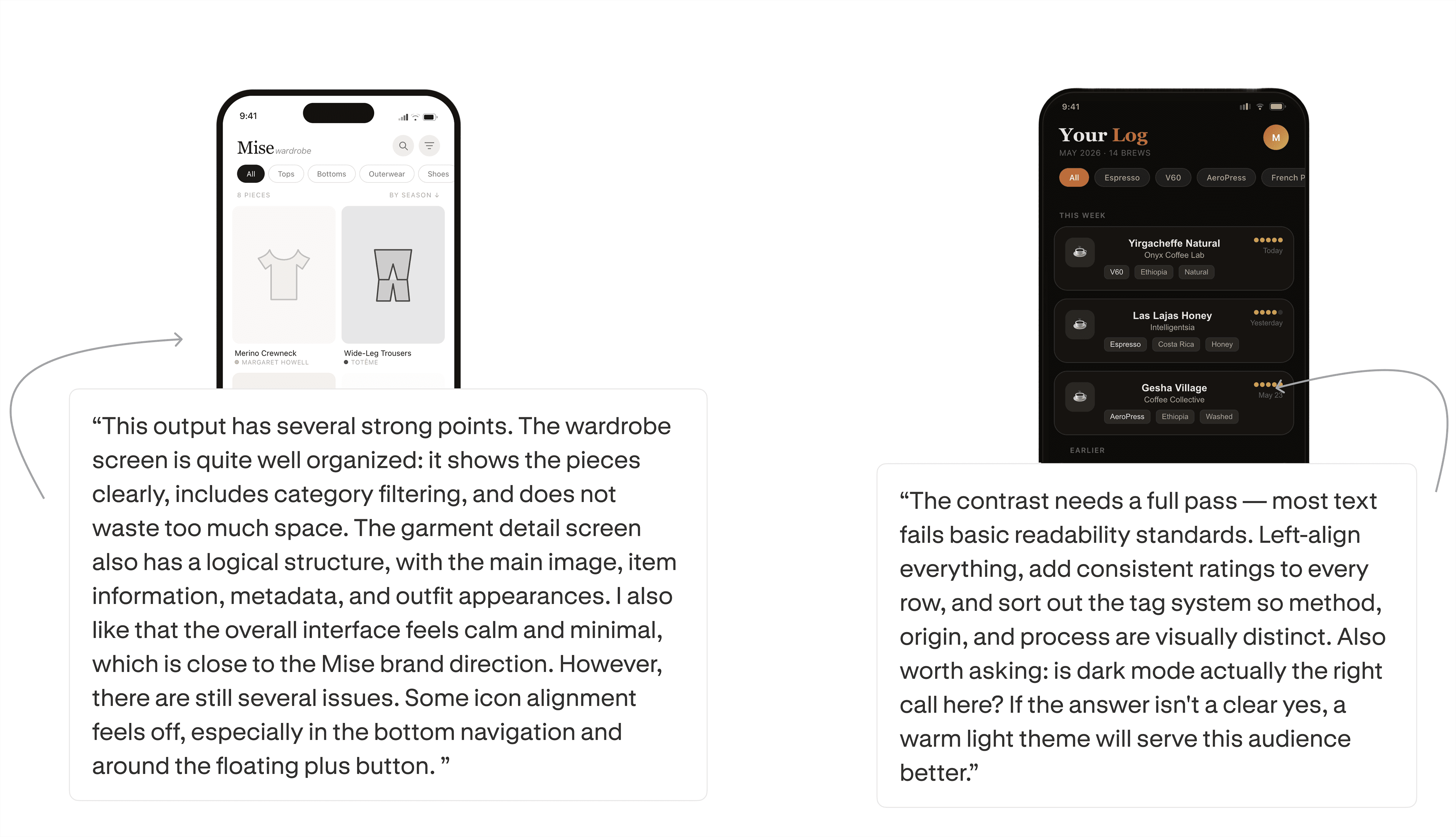
The overall rankings don't convey the whole story, which is that no tool is reliably good. On a per-brief basis, Claude Code won 14 of 15 matchups on Mise (a mobile wardrobe app) and 12 of 15 on Lumen (a web analytics dashboard), but lost all 15 of its matchups on Dial (a mobile coffee-logging app), where not a single evaluator ranked it first, with a dark-mode call that left most text failing basic readability. Antigravity produced the exact mirror image, topping Dial while no evaluator ranked it first on Mise. Every output makes a single aesthetic bet, and when that bet is wrong for the use case, the whole thing collapses no matter how strong the tool is on average. Cursor held steady on most briefs without ever crashing, which is why it leads overall.
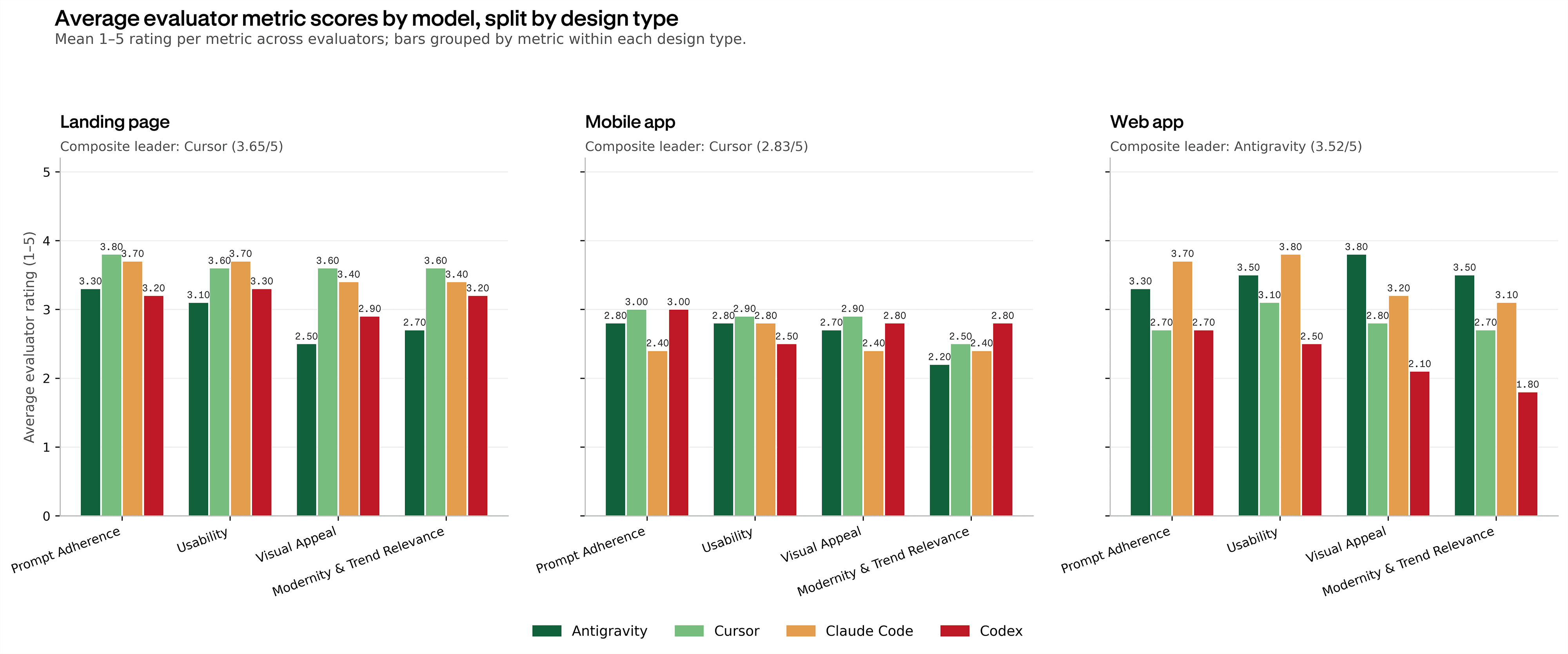
That volatility shows up again when you group by design type. On landing pages, Cursor led with a composite score of 3.65 out of 5. The composite is the average of its four rated dimensions: prompt adherence, usability, visual appeal, and modernity. On web applications, Antigravity took the lead at 3.52. Claude Code scored 3.4 on web apps, close behind. On mobile apps, everything dropped. Cursor led at 2.83, but no tool cleared 3.0.
Mobile was the weakest format across the board. Designers flagged the same problems regardless of tool: inconsistent spacing, navigation that didn't feel native, card layouts that packed too much information into too little space. One designer summarized their reaction to a mobile output by saying it looked like it was built by a template. Consistent padding and spacing problems that wouldn't survive a client presentation.
What kept outputs from clients
The reasons for rejecting outputs were more uniform than the reasons for ranking them first: outputs were generic, and layouts needed structural work.
“Generic / needs refinement” was the most cited reason across all four tools when designers said they wouldn't present to a client, with Codex drawing 19 mentions, nearly double any other tool. But even the top performers weren't immune. Designers said yes to Claude Code's client readiness 63% of the time, but the “yes” rationales still frequently included caveats about refinement.
Layout / hierarchy was the second most common rejection theme. Codex drew 15 mentions, Claude Code drew 9. The complaints were specific: oversized headings wasting viewport space, filter bars that didn't look interactive, hero sections with no product below the fold. One designer described a marketplace output that was entirely a hero with nothing after it. A headline, body text, and then the page ended.
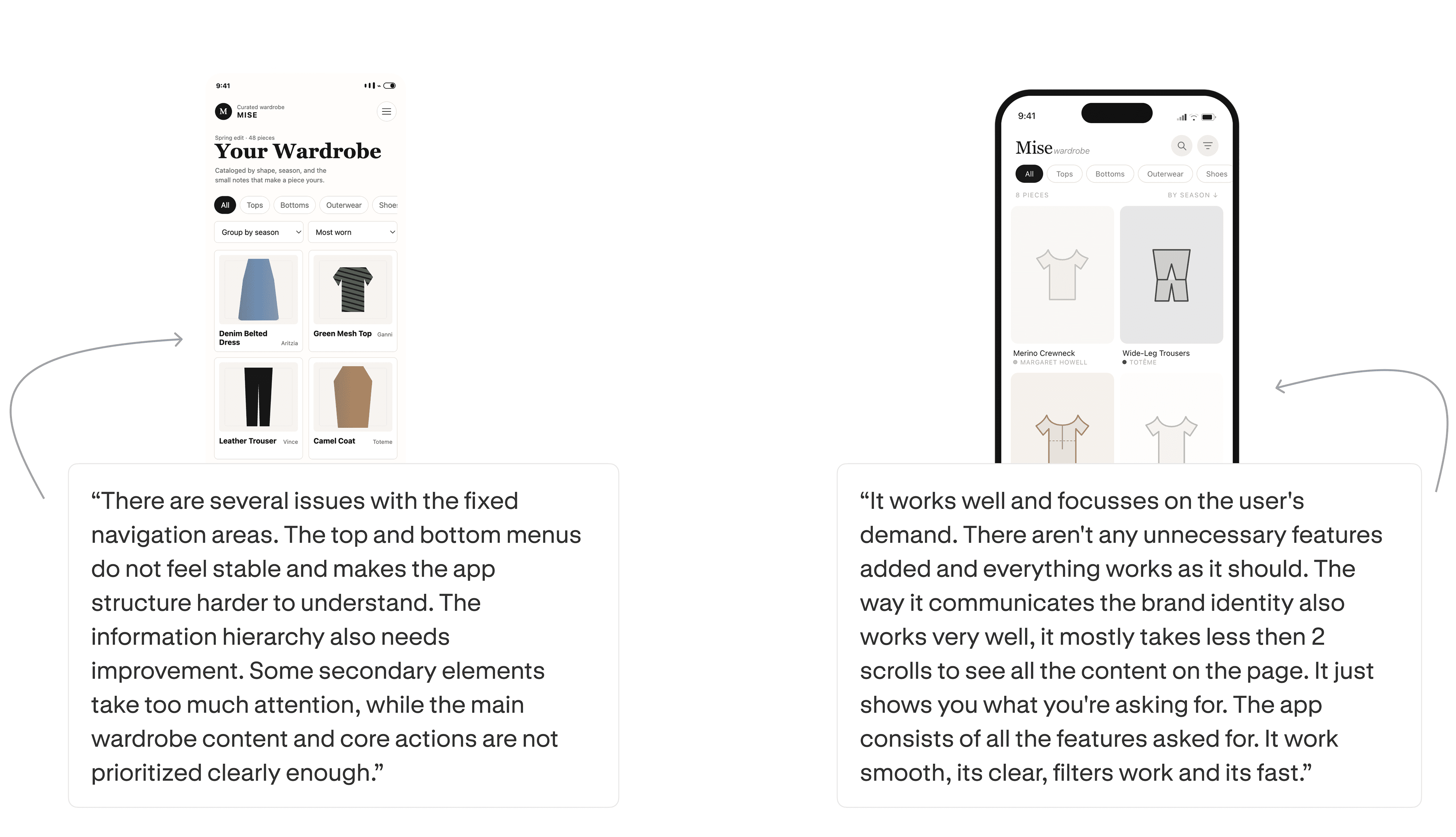
Mobile apps drew the toughest feedback. Evaluators pointed to issues with information architecture, visual styles that felt outdated, and outputs not refined enough for the brief. Of the three format types, mobile had the widest gap between what designers expected and what the tools delivered.
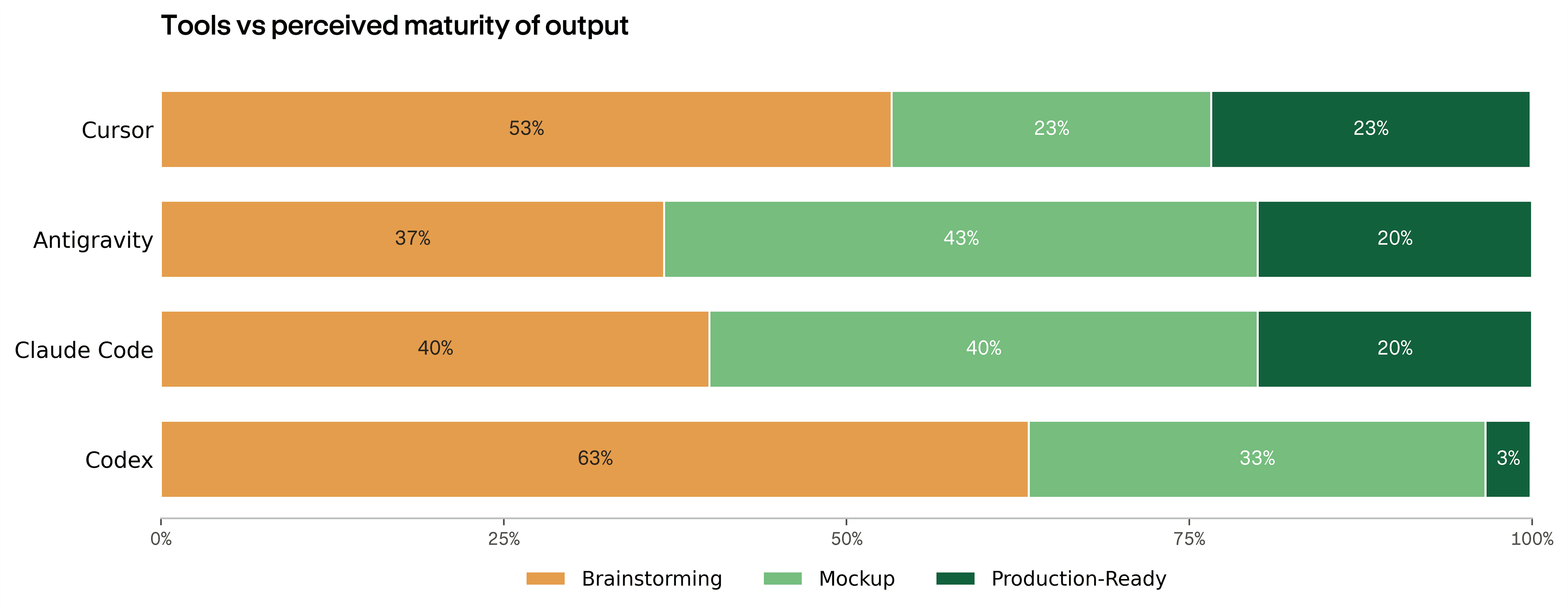
Designers also classified each output by how far along it felt. Across all four tools, production-ready was the exception: no tool got more than a quarter of its outputs there, and most landed at brainstorming or mockup. Codex barely reached production-ready at all.
The verdict
Every tool won something and every tool lost something. Cursor took the most head-to-head matchups but split the room on client readiness. Claude Code drew the most client-ready verdicts but collapsed on briefs that didn't suit it. Antigravity swung between the best output in the set and the worst. Codex trailed on nearly every measure.
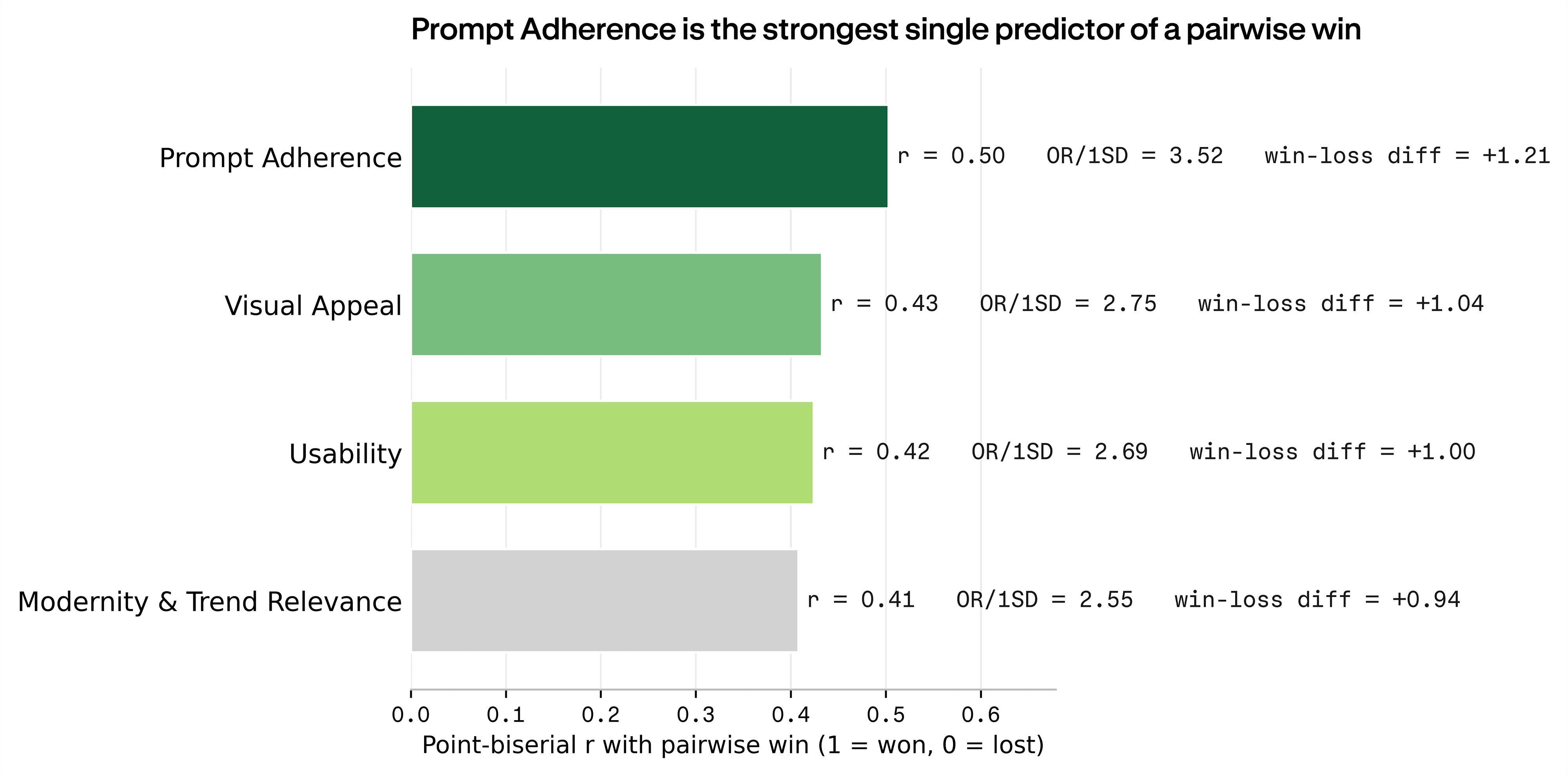
The finding that matters most is that client readiness and side-by-side preference run on different logic. In the tournament, all four dimensions we rated predicted winning a matchup at similar strength, with prompt adherence marginally the strongest. Client readiness flipped that. Once an output met a baseline of adherence, what mattered was whether it felt current. Whether a designer looked at it and thought, this feels like something shipping today. Prompt adherence wins the side-by-side. Taste wins the client's yes. And the tools that won did so by understanding the product. The ones that lost often produced visually capable work that simply missed what was asked for.
So the advice for a designer picking these up today is specific: reach for Cursor on landing pages, Antigravity or Claude Code on web apps, and for mobile, pick whichever you know best and budget real rework since no tool cleared the bar. And treat whatever comes back as a starting point. The tool gives you an opening move. Finishing the work is still the designer's job.
The gap between “looks good in a side-by-side” and “I'd put my name on this” is the gap these tools still need to close.
Methodology
Five working designers in UI/UX, web, and mobile app design sourced from Contra's top-earning talent evaluated six briefs across three format types: two landing pages, two mobile apps, and two web applications, each set in a distinct product domain (crypto, developer tooling, specialty coffee, analytics, luxury fashion, and curated e-commerce). Briefs were written to professional standards and contained a project overview, objective, target audience, brand identity, mood references, and required screens or sections. No color palettes or typography specs were provided, forcing each tool to make its own aesthetic decisions from the brief's tone and references alone.
Each brief was run through all four tools using each tool's default model configuration, producing 24 total outputs:
- Cursor — cursor-agent v2026.05.24-dda726e, composer-2.5
- Claude Code — v2.1.150, claude-sonnet-4-6
- OpenAI Codex — v0.134.0, gpt-5.5-medium
- Google Antigravity — v1.0.2, gemini-3.5-flash-high
A single standardized prompt was used per brief across all tools:
Outputs were evaluated through an interactive interface where each one could be opened, scrolled, clicked, and fully interacted with as a live artifact. Evaluation followed a blinded, pairwise tournament format, with two side-by-side matchups, then a final comparison between winners, producing a rank order per brief. After ranking, evaluators rated each output individually on four dimensions (Prompt Adherence, Usability, Visual Appeal, and Modernity & Trend Relevance) using a shared 1–5 rubric. Ratings triggered conditional follow-ups to capture what specifically drove the score. Evaluators then classified each output by design stage and noted what changes would be required to make it production-ready.
Designers' free-text reasons for not presenting an output to a client were coded into themes using GPT-4o mini, then spot-checked by a member of the team. The seven themes were Layout / hierarchy, Typography / color, Visual polish / aesthetics, Functionality / UX, Brief / prompt alignment, Client-ready foundation, and Generic / needs refinement. We report each theme as the number of evaluator comments that mentioned it. Because these are raw mention counts, they reflect both how often an issue arose and how much detail an evaluator volunteered, so we treat them as indicative rather than exact.
Limitations
Evaluators interacted with live outputs, but the results reflect first-pass capability, not each tool's ceiling under refinement. Each tool used its own default model, so the comparison is at the product level and differences in output reflect the full stack of model selection, prompt engineering, and UI scaffolding, not the underlying model alone. The briefs are fictional, which removes client feedback loops and real-world constraint negotiation from the equation. Only the design surface was evaluated and did not include code quality, performance, or accessibility. Evaluator preferences carry inherent subjectivity and the rubric anchors judgment but doesn't eliminate taste. The sample is small enough that we treat these findings as directional rather than definitive. Inter-rater reliability across the five evaluators was modest (Krippendorff's α = 0.37 for pairwise rankings, 0.15–0.30 for the scalar ratings), meaning individual scores varied widely between evaluators. We place more weight on patterns across tools and briefs than on any single rating.
How we ran this study → Methodology