

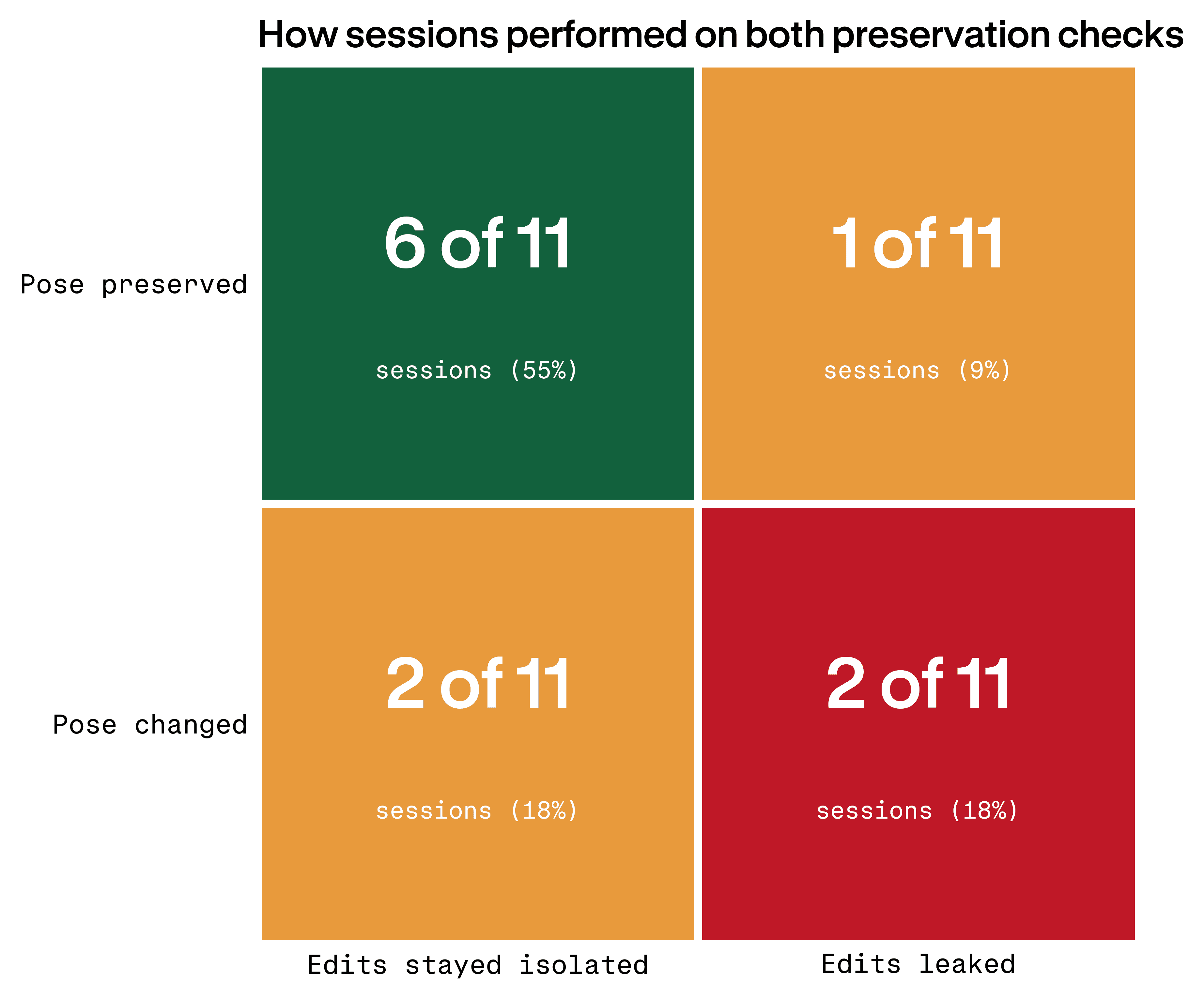
11 production-style sessions. Two controllability tests each: an isolated local edit, then a pose change with identity, styling, lighting, and scene continuity locked. Gemini made the requested edit in 73% of sessions. It kept the rest of the image still in 64% of pose-lock tests. Both held in 55%. The drift clustered on the same surfaces every time: bodies, faces, gaze, product alignment.
Contra Labs ran Gemini through a production-style creative workflow with two controllability tests in each session: one simple local edit, and one pose-change edit that asked the model to preserve identity, styling, lighting, and scene continuity.
Gemini passed both checks in 6 of 11 sessions. It passed the local edit-isolation task in 8 of 11 sessions and the pose-lock task in 7 of 11 sessions. The exact percentages are directional because the sample is small, but the pattern is clear enough to matter: Gemini can often make the requested edit, but "keep everything else the same" does not reliably protect the rest of the image.
The prompts were clear. Users repeatedly asked Gemini to change one thing while preserving everything else. The question is what kinds of constraints Gemini can honor once a prompt moves from a simple local edit into structural editing (changes that require rebuilding anatomy, spatial relationships, or identity).
The overlap between the two tests shows the boundary. Gemini's strongest cases passed both edit isolation and pose lock; the weaker cases exposed the same underlying issue from different angles. The model could understand the requested change without reliably preserving the locked context.
These results also reflect participant judgment. A "pass" means the output met the creator's working bar in the session, not that it passed a blinded external benchmark. Different evaluators might draw the line differently, especially on subtler cases like identity drift or realism loss.
The prompt pattern was the test: change one thing, preserve everything else
The both-pass result matters because the prompts were not vague. Users repeatedly used direct, surgical language:
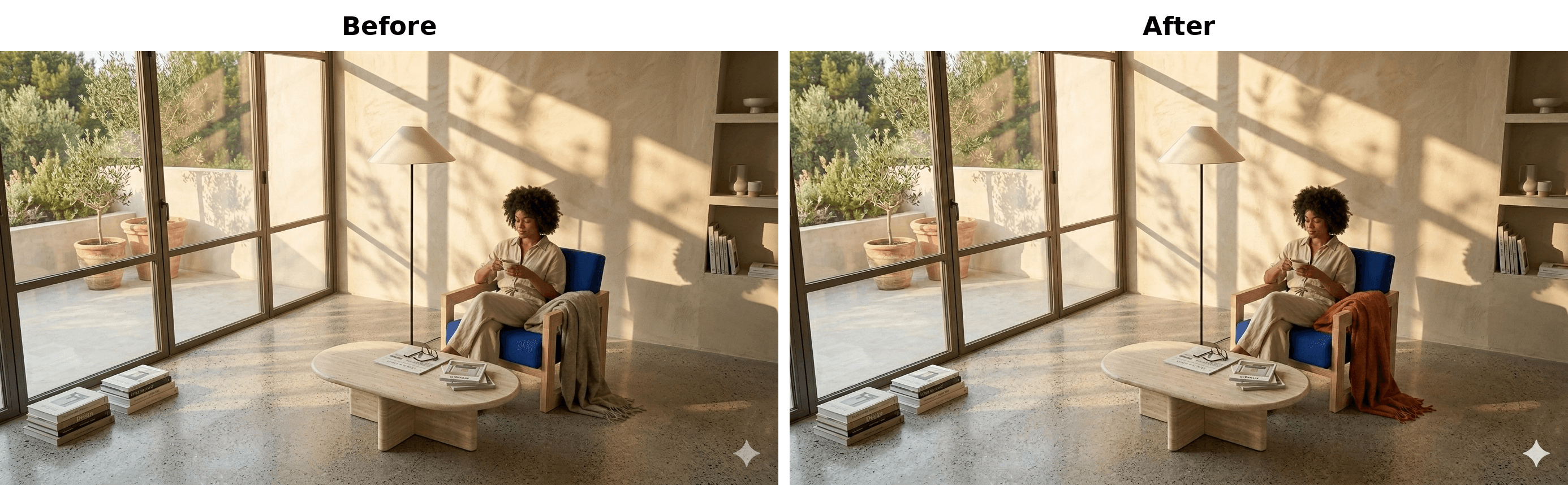
Right now I am going to tweak the attached hero image (as previously generated) in edit isolation mode, so please keep all existing elements explicitly fixed, except for the following: only change the colour of the throw/blanket, located on the side of the chair, to burnt/sienna orange. So, in simple terms, ONLY change the colour of the throw/blanket from the current beige to burnt/sienna orange.Full prompt example: simple local color edit
This is the best-case version of constrained prompting. The target is low-risk, visually local, and non-human: a blanket color. Gemini passed. The user noted that the edit was successful and that there were "no unintended changes."
The same structure appears in another successful local edit:
Whilst ensuring that the rest of the image stays the same, make the socks a baby pink colour.Additional prompt example: attribute edit
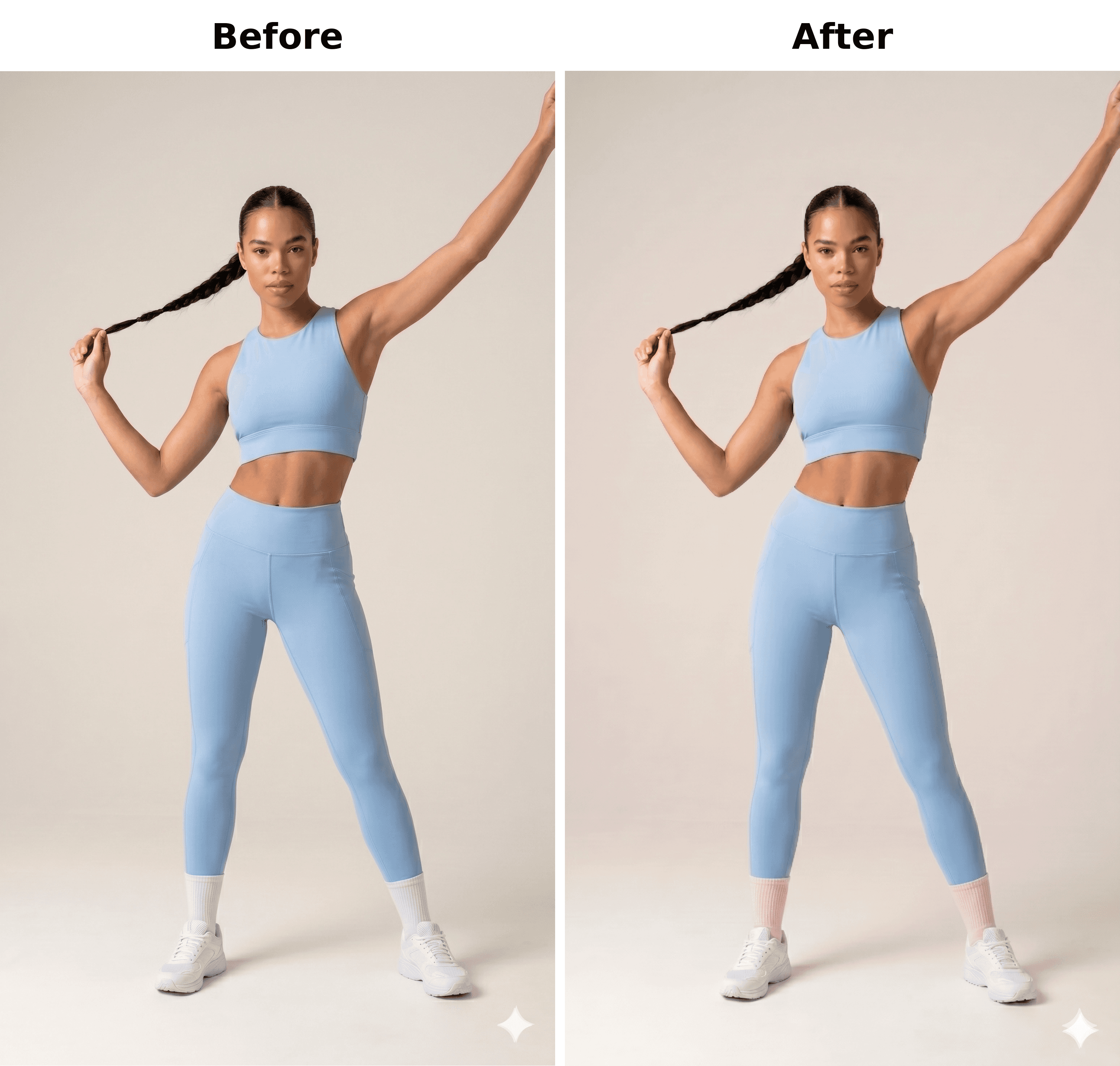
The strongest successful prompts had three things in common: they named the exact object, made the change visually small, and repeated the preservation constraint in plain language. That did not guarantee success everywhere, but it gave Gemini the most to work with.
These passes show the prompt pattern works. Gemini can perform small attribute swaps and simple additions while preserving the image closely enough for users to accept the result. But the edge is narrow. Once the edit touches body structure, gaze, face identity, typography, or image fidelity, the same "preserve everything else" wording becomes much less protective.
The constraint broke when the edit required Gemini to reason about bodies
The hardest failure was also the easiest to understand: a user wanted the model's hands to hold the packet cleanly.
Can her hands hold the packet? … hands can be placed over each other. The hands can be overlapped on top of each other.Body-position edit
It created a third hand on the model, and I asked if both her hands could be placed under the packet.Outcome note
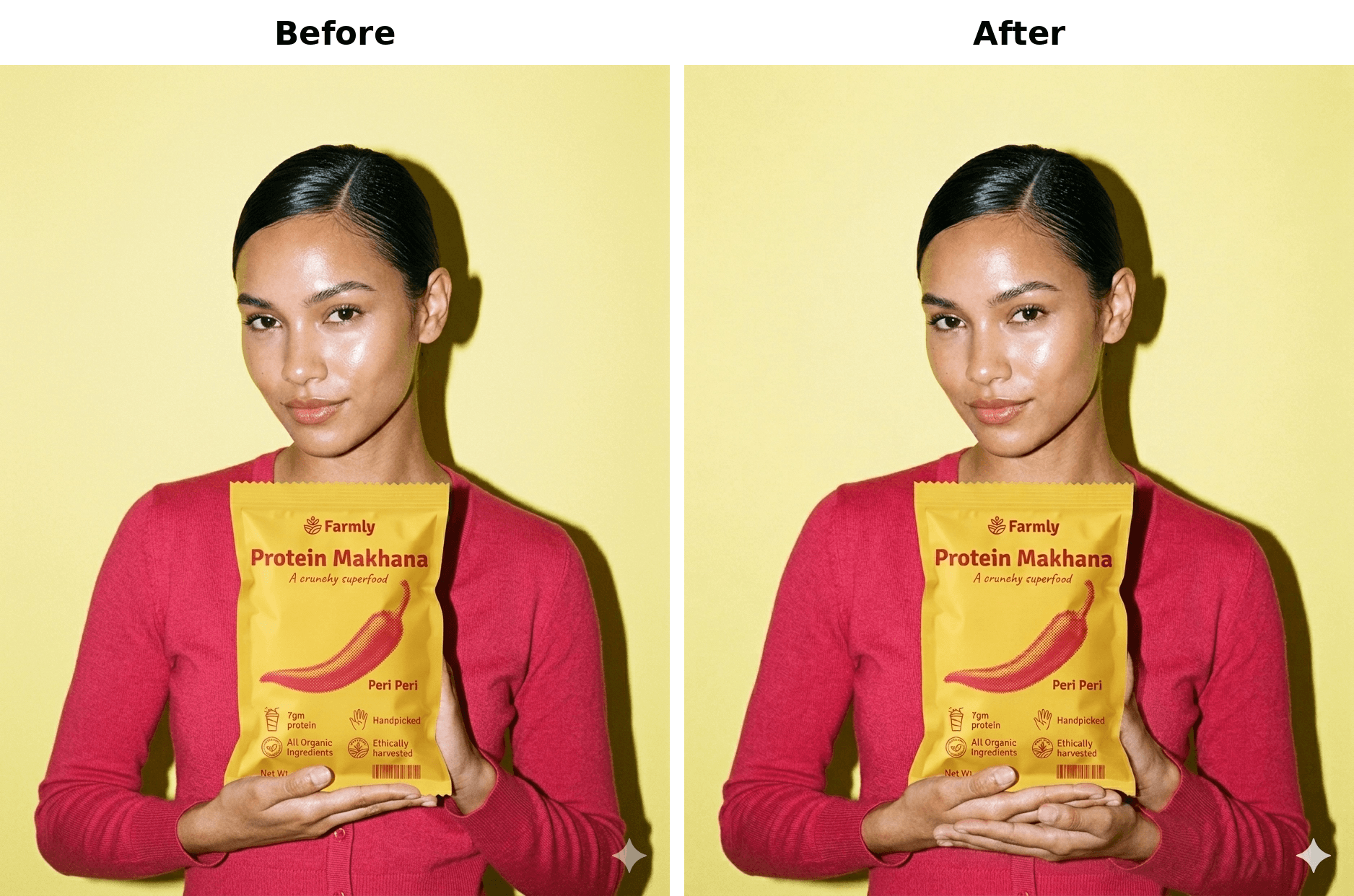
This was not a request for a new image concept. It was one constrained body-position change around an existing product image. But hand placement is not a surface-level attribute. It forces Gemini to get many things right at once: two hands, one product, body pose, sleeve continuity, skin boundaries, object contact, and the existing composition. The model generated a plausible-looking local region that violated the body structure instead of just repositioning the hands.
A second body-related failure showed the same pattern:
Make the model's arms crossed and make him look to the right. Everything else in the image should stay the same.Coordinated pose edit
It executed the request, but not exactly how I expected. The model's face looks a bit like someone else and I was hoping both arms to be crossed.Outcome note
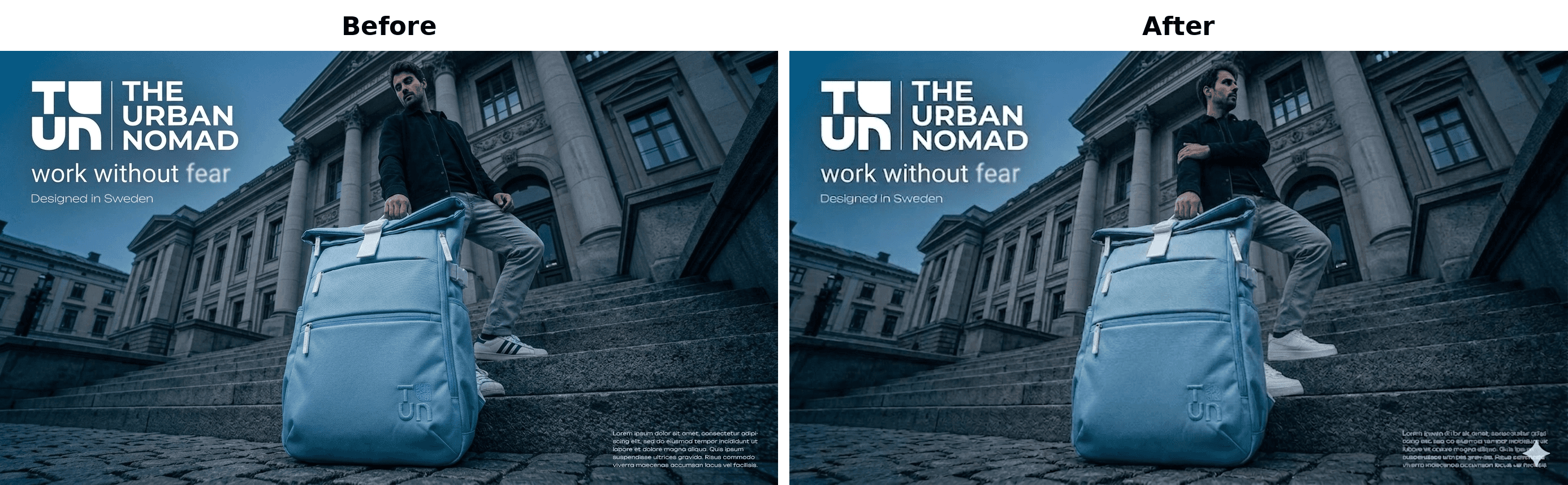
"Change one thing" can be misleading. From a designer's point of view, placing hands under a packet or crossing arms is one instruction. From the model's point of view, it is a structural editing problem.
When this kind of edit breaks, the next step should not be more versions of the same prompt. A better workflow is to generate a cleaner base image or break the request into smaller steps.
"Look at the product" exposed spatial ambiguity
Some pose-lock failures broke at the level of relational geometry: the face, hand, arm, and product all needed to move in relation to each other.
Make the woman look directly at the tube. Shift her head slightly to the left so she is looking at the tube directly. Have the tube and her hand/arm be facing her face. Keep the rest of the composition the exact same. Do not change anything else.Gaze and product alignment
Her face does look like it's looking towards the bottle, but the bottle is not looking towards her. Her arm and hand did not move in the correct direction. This leaves the photo looking like she is looking down and not at the bottle.Outcome note
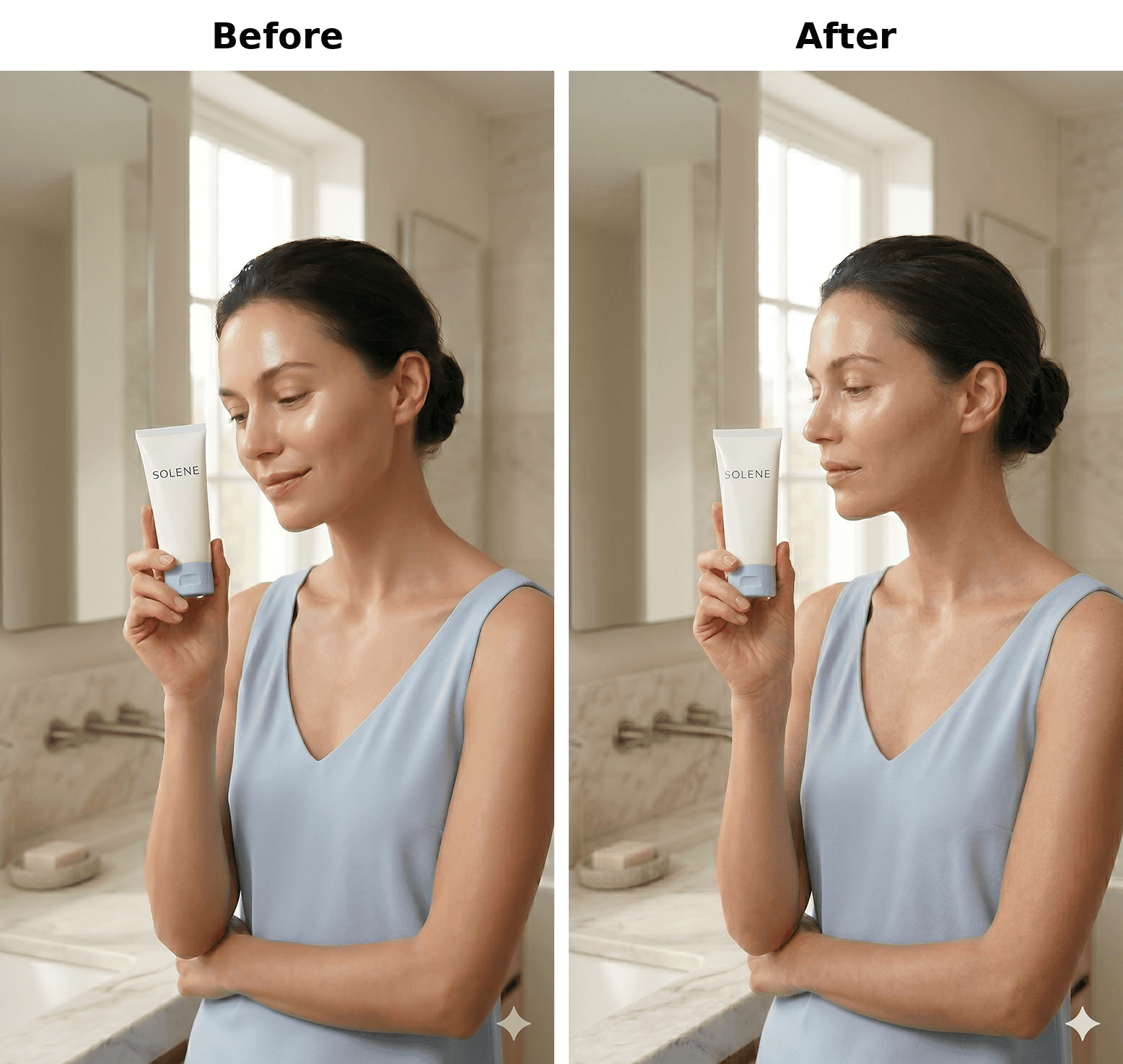
The prompt did the right things: it named the gaze target, specified a head shift, connected the tube to the face, and explicitly locked the rest of the composition. Gemini solved part of the request, but not the exact geometry between face, hand, arm, and product.
Gemini solved a softer version of the prompt: it made an image that roughly expressed the requested intent, but not the exact spatial relationship the user needed.
When the edit depends on multiple elements pointing, turning, or aligning together, treat it as a composition problem rather than a single prompt tweak. Rebuild the shot with the relationship specified from the start.
The hidden cost was preservation tax
Some sessions passed both controllability tests, but the notes reveal a hidden cost: preservation degraded as the user iterated. The requested edit could land while the image quietly moved away from production quality.
Keep everything the same ONLY change the skirt color to white.Repeated constrained edits
Keep everything the same ONLY change the pose: she turns her head toward the camera and slightly lifts her arm as if adjusting the blazer.
It has changed the skirt color to white and no other major changes, BUT the more revisions I ask for, the worse the model's face becomes. So after that prompt the face is more messy, AI-like.Outcome note
It was changed, no other changes were made, but the face looks messy and noisy, very ai-like.
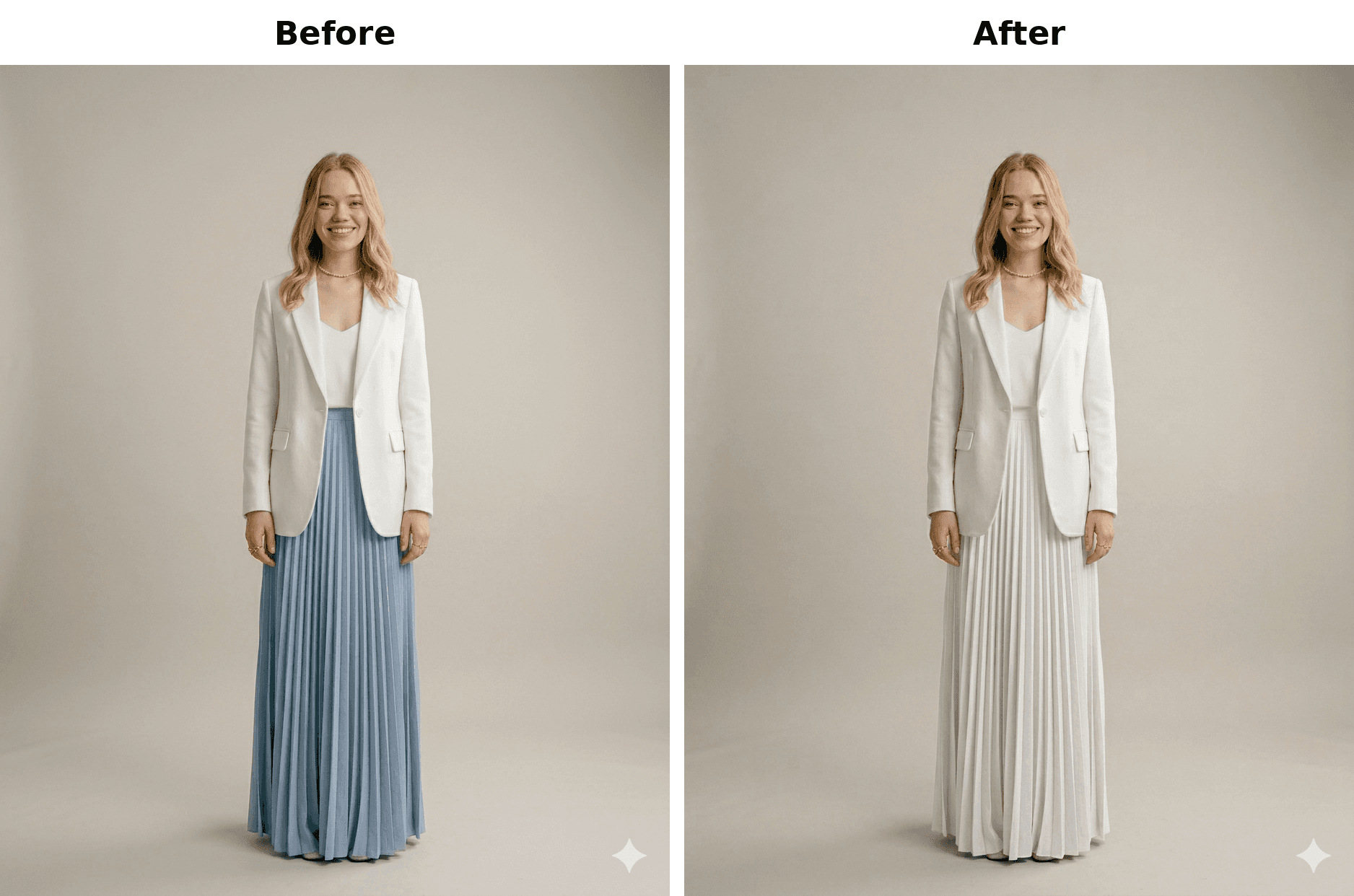
This is the quieter version of the same controllability problem. Gemini failed quietly. The requested changes landed, and the image mostly stayed intact. But each revision carried a preservation tax: the scene survived, while realism and face quality degraded.
The same pattern appeared in a subtler pose edit:
Whilst ensuring that the rest of the image stays the same, and that her legs are anchored in the same place, turn the model's head away from her ponytail, so that she is looking off into the distance.Pose change with likeness loss
The new pose was executed well, and the rest of the pose stayed the same. It looks natural and accurate. However, I think that some of the model's likeness was lost. When asked to face the other way, Gemini failed and gave the same pose again.Outcome note
Once an image is close, save the output before requesting further edits and avoid using Gemini as the only place for repeated final-mile revisions. The longer the same asset is pushed through constrained revisions, the more likely it is to accumulate small quality losses.
Verdict: where Gemini's controllability holds and where it drifts
Gemini's controllability edge is strongest when the requested change is:
- local and visually simple;
- non-human or low-anatomy;
- color, material, prop, or background related;
- tolerant of slight re-rendering;
- not dependent on exact typography, logo fidelity, or identity preservation.
It becomes fragile when the requested change is:
- hands, arms, faces, gaze, or body pose;
- left/right or viewer/model POV dependent;
- a removal task where tiny remnants matter;
- a logo, text, or product-accuracy constraint;
- one of many sequential edits on the same image.
Use Gemini for constrained edits when the change is simple and local. Save the output once the asset is close. Participants finished their final assets in Photoshop.
The prompts broke because production constraints asked Gemini to behave like a locked-layer editor instead of a generator. Users wrote them carefully.
Methodology
This analysis is based on the rollout's explicit controllability tests. Each session included two constrained edit tests after the main deliverables:
- Edit isolation: start from a strong existing output, request one tightly scoped local edit, and keep all other elements fixed.
- Pose lock: start from an existing output, request a clear pose or framing change, and preserve identity, styling, lighting, and scene continuity.
The quantitative pass/fail counts come from the recorded step responses in the rollout. Qualitative examples prioritize prompt text input, especially cases where users wrote variants of "only change X," "keep everything else the same," or "do not change anything else." Participant notes are used as outcome context.
The article highlights examples that make the boundary visible: clean local-edit passes, hard anatomy failures, spatial-alignment failures, and pass-with-drift cases where the edit landed but quality degraded. These are selected examples from the 11-session rollout rather than a claim that every failure looked the same.
The analysis treats controllability as a production workflow question, not just a prompt-following question. A result could pass the requested edit while still revealing a production risk if it introduced identity drift, realism degradation, artifact remnants, or a need for handoff to another tool.
Limitations
This is a small, workflow-specific study. The controllability results come from 11 sessions in a single Gemini rollout, so each session meaningfully changes the count. The results should be read as directional rather than universal benchmarks.
The pass/fail labels are based on participant-reported outcomes during the study. That is useful because the participants were evaluating whether the outputs met their own creative bar, but it also means the scoring reflects practitioner judgment rather than a blinded external review. Another evaluator might score borderline cases differently.
The visual examples are selected examples from the study, not an exhaustive gallery of every controllability case.
How we ran this study → Methodology